- 888-683-3510
- support@siriuspowerpc.com
- Free Shipping On All Orders Above $1500
$4,869.99
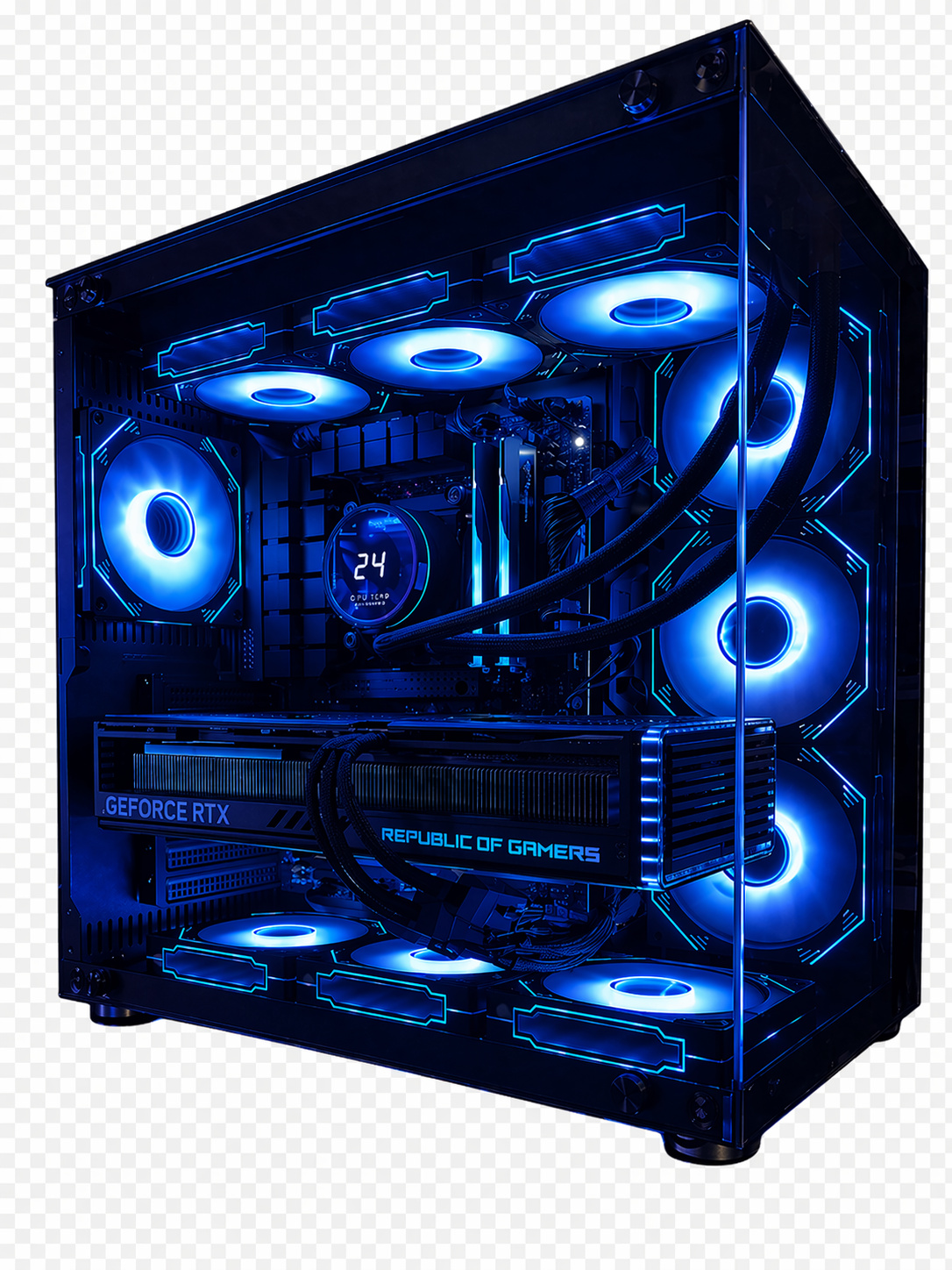
The Matrix Ultra 28590 Core Ultra 9 285K RTX 4090 Gaming PC is built for customers who need premium 4K gaming, 24GB of graphics memory, strong multicore processing, NVIDIA creator acceleration, and a modern Intel platform in one complete Sirius Power PC.
This system pairs the Intel Core Ultra 9 285K with the ASUS ROG Strix Gaming OC GeForce RTX 4090 24GB.
The Core Ultra 9 285K contains 24 cores and 24 threads, divided between eight performance cores and sixteen efficiency cores. It reaches up to 5.7GHz, carries a 125W processor base-power rating, and can reach 250W under maximum turbo operation.
The RTX 4090 remains the defining performance component. NVIDIA equips it with 16,384 CUDA cores, 24GB of GDDR6X memory, a 384-bit memory interface, third-generation ray-tracing cores, fourth-generation Tensor cores, and DLSS 3.5 support.
This build uses the premium ASUS ROG Strix RTX 4090 OC, not a basic reference-style card. ASUS lists a 2640MHz OC-mode boost clock, 24GB GDDR6X memory, a 384-bit interface, a large 3.5-slot cooling system, and a vapor-chamber design intended to handle the GPU’s substantial thermal output.
The rest of the system is configured to support that performance level:
This is not simply an RTX 4090 placed inside the least expensive compatible platform.
The Matrix Ultra 28590 is built around premium graphics, high-core-count Intel processing, substantial cooling, modern networking, extensive expansion, and enough power capacity for sustained gaming and production workloads.
Core Ultra processing. ROG Strix RTX 4090 graphics. Matrix presence. Sirius Built.
| Component | Specification | What It Delivers |
|---|---|---|
| Processor | Intel Core Ultra 9 285K, 24 Cores / 24 Threads, 3.7GHz P-Core Base, up to 5.7GHz Turbo | Strong multicore production, gaming, streaming, compiling, rendering, and heavy multitasking |
| CPU Cooler | Sirius 360mm AIO Liquid Cooler | High-capacity cooling for sustained processor workloads |
| Motherboard | Gigabyte Z890 AORUS ELITE WIFI7 ATX LGA1851 | Modern Intel platform with DDR5, Wi-Fi 7, PCIe expansion, multiple M.2 slots, 2.5Gb Ethernet, and Thunderbolt 4 |
| Memory | 32GB RGB DDR5-6000 CL36, 2×16GB | Dual-channel memory for gaming, streaming, editing, and creator applications |
| Storage | 2TB PCIe 4.0 NVMe SSD | Fast primary storage for games, applications, recordings, and active projects |
| Graphics Card | ASUS ROG Strix Gaming OC GeForce RTX 4090 24GB | Premium 4K gaming, ray tracing, GPU rendering, AI acceleration, and 24GB VRAM |
| Case | Sirius Matrix Series | Showcase Sirius chassis built around high-performance hardware |
| Case Cooling | Ten Case Fans | Strong airflow around the RTX 4090, motherboard, storage, radiator, and power-delivery hardware |
| Power Supply | 1200W PSU | Substantial capacity for the high-power CPU, RTX 4090, cooling system, expansion, and future upgrades |
| Protection Package | Professional build, 3-Year Labor Warranty, manufacturer warranties, lifetime technical support, insured shipping, wooden crate protection, and FREE GAME | Complete Sirius assembly, testing, protection, and long-term support |
Operating-system note: An operating system was not included in the supplied parts list. The product page should not claim that Windows is included unless an operating-system option is added to the final configuration.
The name identifies the two parts that determine the build’s performance class:
Matrix Ultra 28590 also reflects the role of this system.
It is not intended as a mainstream gaming PC. It is a premium gaming and production platform built for users who can use:
The name fits the system rather than simply adding a new version number to an older product.
The Core Ultra 9 285K is not simply a renamed i9-14900K.
It belongs to Intel’s Core Ultra desktop Series 2 generation and uses the newer LGA1851 platform.
Intel lists the processor with:
Unlike the i9-14900K, the 285K does not use Hyper-Threading. Each of its 24 cores supplies one processing thread.
That changes how the system should be described.
The Core Ultra 9 285K is especially suited to mixed workloads involving:
It is not necessary to claim that it is the fastest gaming processor available.
The reason to choose this system is the combination of a premium RTX 4090, modern Intel platform, strong multicore resources, and extensive connectivity.
The ASUS ROG Strix Gaming OC RTX 4090 24GB determines the Matrix Ultra 28590’s gaming and GPU-compute class.
The RTX 4090 provides:
The 24GB graphics-memory capacity is particularly important.
It provides more room for:
This is where the RTX 4090 continues to separate itself from mainstream and upper-midrange graphics cards.
Not every RTX 4090 has the same cooler, physical design, or factory clock.
The Matrix Ultra 28590 uses the ASUS ROG Strix Gaming OC RTX 4090.
ASUS specifies:
The large cooler and vapor chamber are particularly relevant in this Matrix configuration.
An RTX 4090 produces substantial heat during long gaming, rendering, and AI workloads. The large ROG Strix cooler works together with the Matrix case and ten-fan airflow system to move that heat away from the GPU.
This is not just a branding upgrade.
It affects the card’s dimensions, cooling capacity, noise profile, and appearance.
The Matrix Ultra 28590 is designed primarily for 4K gaming.
A normal 1080p display will not make practical use of the RTX 4090’s graphics capacity.
This build makes more sense with:
At 4K, the RTX 4090 can use its performance for:
The Core Ultra 9 provides enough processor resources to support gaming while background applications remain active.
The Matrix Ultra 28590 is also exceptionally fast at 1440p.
At that resolution, the RTX 4090 has far more graphics headroom than a normal 144Hz experience requires.
That makes 1440p most useful for:
In these scenarios, the processor and game engine increasingly influence performance because the RTX 4090 can render frames faster than many games can feed them.
The system should therefore be positioned as:
4K for premium visual gaming
and
1440p for extremely high refresh rates
Exact frame rates vary by game version, driver, graphics settings, ray tracing, DLSS mode, Frame Generation, map, background software, and cooling conditions.
The ranges below describe the expected performance class rather than guaranteed results.
| Game | 4K High/Ultra Estimate | 1440p High/Ultra Estimate | Best Use |
|---|---|---|---|
| Call of Duty: Warzone | 140–200+ FPS | 200–280+ FPS | High-refresh competitive gaming |
| Fortnite | 130–200+ FPS | 200–300+ FPS | Premium visuals or high-refresh play |
| Apex Legends | 180–240+ FPS | 240–320+ FPS | Extremely smooth multiplayer gaming |
| Valorant | 350+ FPS | 450+ FPS | High-refresh esports |
| Counter-Strike 2 | 260–380+ FPS | 350–500+ FPS | Competitive low-latency gaming |
| Cyberpunk 2077 with DLSS and Tuned Ray Tracing | 90–140+ FPS | 140–200+ FPS | Premium ray-traced visuals |
| Red Dead Redemption 2 | 110–160+ FPS | 160–230+ FPS | Cinematic open-world gaming |
| Forza Horizon 5 | 160–220+ FPS | 220–300+ FPS | High-resolution racing |
| Baldur’s Gate 3 | 140–200+ FPS | 190–270+ FPS | Smooth RPG performance |
| Microsoft Flight Simulator | 80–130+ FPS | 120–180+ FPS | High-detail simulation |
Frame Generation can increase displayed FPS in supported games, but generated frames should not be treated as identical to natively rendered frames.
The RTX 4090 uses NVIDIA’s Ada Lovelace architecture.
It supports:
DLSS can render supported games below the monitor’s native resolution and reconstruct the final image using NVIDIA’s trained models.
Supported RTX 40-series games can generate additional frames between traditionally rendered frames.
Supported titles can use AI-assisted reconstruction to improve ray-traced effects.
Reflex can reduce system latency in supported competitive games.
NVIDIA’s hardware encoder supports gameplay recording, streaming, and compatible production workflows.
These features help the RTX 4090 handle workloads that would be extremely demanding through native rendering alone.
The Matrix Ultra 28590 is also a serious GPU-accelerated production system.
The combination of a 24-core Intel processor and 24GB NVIDIA GPU makes it suitable for:
The processor and graphics card serve different roles.
The Core Ultra 9 provides broad CPU resources and handles system-level work.
The RTX 4090 accelerates compatible graphics, rendering, encoding, AI, and CUDA workloads.
The Matrix Ultra 28590 is well suited for demanding Premiere Pro workflows.
The CPU provides resources for:
The RTX 4090 provides CUDA acceleration, GPU effects, and hardware encoding support in compatible workflows.
This system is a strong fit for:
The standard 32GB memory configuration is appropriate for many projects.
Large professional timelines may benefit from a 64GB or larger future memory configuration.
DaVinci Resolve can make extensive use of graphics performance.
The RTX 4090’s 24GB VRAM provides room for:
The Core Ultra 9 supports decoding, background software, file management, and general system responsiveness.
For frequent professional video work, adding separate media and cache drives may improve storage organization and workflow efficiency.
After Effects performance depends on composition complexity, effects, system memory, processor performance, and GPU acceleration.
The Matrix Ultra 28590 is suitable for:
The base 32GB memory configuration is the first component professional After Effects users may eventually want to expand.
The processor and RTX 4090 are high-end, but very large compositions can still become memory limited.
The RTX 4090 makes the Matrix Ultra 28590 particularly strong for Blender and compatible rendering applications.
NVIDIA’s CUDA and OptiX support can accelerate:
The 24GB VRAM capacity allows larger scenes to remain in GPU memory than cards with 12GB or 16GB.
The Core Ultra 9 supports modeling, simulation, background applications, and CPU-side tasks.
The Matrix Ultra 28590 is also suited to Unreal Engine and game-development workloads.
The system provides:
That combination supports:
Professional projects may benefit from more memory and additional dedicated project storage.
The RTX 4090’s 24GB VRAM makes this system useful for many local AI and CUDA workloads.
Potential uses include:
The practical workload limit depends on the model, software framework, numerical precision, batch size, and required VRAM.
The RTX 4090 is extremely capable for a consumer graphics card, but it does not remove every limitation associated with professional AI workloads.
The Matrix Ultra 28590 includes 32GB RGB DDR5-6000 CL36 memory in a 2×16GB configuration.
The public product copy does not need to identify the memory manufacturer.
The important specifications are:
This configuration is suitable for:
For gaming, 32GB is already a strong capacity.
Additional memory may be useful for:
Increasing memory does not automatically increase gaming FPS.
The advantage is greater working capacity for applications that can actually use more than 32GB.
The Matrix Ultra 28590 includes a 2TB PCIe 4.0 NVMe SSD.
This gives the system fast storage for:
Two terabytes is a practical starting capacity for a system at this level.
However, large game libraries, 4K footage, 3D assets, and AI models can fill the drive quickly.
The Gigabyte Z890 AORUS ELITE WIFI7 provides multiple M.2 storage positions and standard SATA connections.
Gigabyte lists four M.2 connectors on the platform, along with extensive USB and PCIe connectivity.
That gives customers room to add dedicated drives for:
This is one area where the newer Z890 platform provides meaningful practical value.
The Gigabyte Z890 AORUS ELITE WIFI7 supports Intel Core Ultra desktop Series 2 processors and DDR5 memory.
Gigabyte lists features including:
That makes the motherboard a much more modern foundation than the previous Z790/LGA1700 system.
The platform provides room for memory, storage, capture hardware, networking, and other future expansion.
The Matrix Ultra 28590 includes modern networking and high-speed external connectivity.
Wi-Fi 7 supports modern wireless networks and the 6GHz band where available.
Actual performance depends on:
The wired connection can exceed standard Gigabit Ethernet when paired with compatible networking hardware.
This is useful for:
The motherboard includes Thunderbolt 4 connectivity for compatible storage, docks, displays, and professional equipment.
This gives the Matrix Ultra greater external expansion capability than many normal gaming PCs.
Intel lists the Core Ultra 9 285K with a maximum turbo-power rating of 250W.
That makes a substantial cooling system appropriate for sustained all-core workloads.
The Sirius 360mm AIO gives the processor thermal capacity for:
Cooling performance still depends on ambient temperature, BIOS settings, workload, radiator position, and fan behavior.
The 360mm AIO is included because this is a high-end unlocked processor, not because a larger cooler looks better on the specification sheet.
The Matrix Ultra 28590 includes ten case fans.
The cooling system must manage heat from:
The large ROG Strix GPU cooler handles heat at the graphics-card level, while the Matrix airflow system removes that heat from the chassis.
This combination is especially important during long gaming, rendering, video-export, and AI workloads.
The Matrix Ultra 28590 includes a 1200W power supply.
The purpose is not to claim that the PC continuously consumes 1200W.
The extra capacity provides room for:
The 1200W PSU gives the complete system more headroom than a build designed around minimum requirements.
That is appropriate for a premium RTX 4090 configuration.
The Matrix Ultra 28590 is a strong fit for:
Players using 4K high-refresh or high-resolution ultrawide monitors.
Users who play, broadcast, record, and manage production tools from one PC.
Creators working in Premiere Pro, Resolve, After Effects, or similar software.
Blender, Unreal Engine, animation, visualization, and rendering users.
Customers who benefit from CUDA acceleration and 24GB of GPU memory.
Users who compile, run development environments, test applications, and multitask heavily.
Customers who specifically want LGA1851, Z890, Wi-Fi 7, Thunderbolt 4, and Core Ultra architecture.
An AMD X3D processor paired with a similar GPU may provide a more gaming-focused value proposition.
Customers wanting RTX 50-series Multi Frame Generation and Blackwell features should compare current RTX 5080 and RTX 5090 systems.
The RTX 4090 remains a high-power graphics card. A lower-tier GPU may suit customers prioritizing efficiency.
This system is far more powerful than most 1080p users require.
That is where the Matrix Ultra 28590 makes the most sense.
The Matrix Ultra 28590 includes:
✅ Intel Core Ultra 9 285K
✅ 24 cores and 24 threads
✅ Up to 5.7GHz turbo frequency
✅ ASUS ROG Strix Gaming OC RTX 4090
✅ 24GB GDDR6X graphics memory
✅ 16,384 CUDA cores
✅ Vapor-chamber GPU cooling
✅ Ray tracing
✅ DLSS support
✅ CUDA and NVENC acceleration
✅ Gigabyte Z890 AORUS ELITE WIFI7
✅ Wi-Fi 7
✅ 2.5Gb Ethernet
✅ Thunderbolt 4
✅ Four DDR5 memory slots
✅ 32GB RGB DDR5-6000
✅ 2TB PCIe 4.0 NVMe storage
✅ Sirius 360mm AIO
✅ 1200W PSU
✅ Sirius Matrix Series case
✅ Ten case fans
✅ Professional Sirius assembly
✅ Full system stress testing
✅ Thermal verification
✅ 3-Year Labor Warranty
✅ Applicable manufacturer warranties
✅ Lifetime Technical Support
✅ Insured shipping
✅ Wooden crate protection
✅ FREE GAME included
This system is not built around a single impressive part.
The CPU, GPU, motherboard, power supply, cooling system, storage, and chassis all belong in the premium performance category.
| Feature | Matrix Ultra 28590 | Typical RTX 4090 Prebuilt |
|---|---|---|
| CPU | Core Ultra 9 285K, 24 Cores | Varies |
| GPU | ASUS ROG Strix Gaming OC RTX 4090 24GB | Often unspecified RTX 4090 model |
| GPU Cooling | Large 3.5-slot vapor-chamber design | Varies |
| Motherboard | Gigabyte Z890 AORUS ELITE WIFI7 | Often lower-tier or unspecified |
| Memory | 32GB DDR5-6000 | Often 32GB–64GB |
| Storage | 2TB PCIe 4.0 NVMe | Often 1TB–2TB |
| Wireless | Wi-Fi 7 | Varies |
| Wired Network | 2.5Gb Ethernet | Varies |
| High-Speed I/O | Thunderbolt 4 | Often unavailable |
| Cooling | Sirius 360mm AIO and ten case fans | Varies |
| Power Supply | 1200W | Often 1000W–1200W |
| Case | Sirius Matrix Series | Generic or proprietary |
| Labor Warranty | Three years | Varies |
| Technical Support | Lifetime | Usually limited |
| Shipping | Insured with wooden-crate protection | Usually standard packaging |
The Matrix Ultra’s advantage is the quality and capability of the system surrounding the RTX 4090.
Every Matrix Ultra 28590 includes:
The system is assembled and tested as a complete PC before shipment.
The Matrix Ultra 28590 Core Ultra 9 285K RTX 4090 Gaming PC is built for customers who want premium 4K gaming, 24GB GPU memory, modern Intel connectivity, and serious production capability in one system.
The Core Ultra 9 285K provides 24 cores, up to 5.7GHz turbo performance, strong multicore resources, and Intel’s newer LGA1851 platform.
The ASUS ROG Strix Gaming OC RTX 4090 provides 24GB GDDR6X memory, premium 4K graphics, ray tracing, DLSS, CUDA acceleration, NVENC encoding, and a substantial vapor-chamber cooling system.
The Gigabyte Z890 AORUS ELITE WIFI7 adds Wi-Fi 7, 2.5Gb networking, Thunderbolt 4, DDR5 support, and extensive storage expansion.
The 32GB DDR5-6000 memory is a strong gaming and general production baseline.
The 2TB PCIe 4.0 NVMe SSD provides practical capacity for games and active projects.
The Sirius 360mm AIO and ten case fans provide cooling appropriate for a 250W-class processor and RTX 4090 graphics card.
The 1200W PSU gives the complete configuration substantial power capacity and room for expansion.
This is not the best choice for customers who only need ordinary 1080p gaming.
It is built for users who play at 4K, edit, render, stream, create, develop, run AI tools, and need one system capable of carrying several demanding roles.
Core Ultra processing. ROG Strix RTX 4090 graphics. Matrix engineered. Sirius Built.
The recommended new name is Matrix Ultra 28590 Core Ultra 9 285K RTX 4090 Gaming PC.
The 285 identifies the Core Ultra 9 285K, while 90 identifies the RTX 4090. The Ultra name distinguishes the newer LGA1851 platform from the older Matrix Pro system.
Yes. Premium 4K gaming is the primary gaming target for this RTX 4090 system.
Yes. At 1440p, it is especially suited for extremely high-refresh competitive gaming.
It contains 24 cores, divided between eight performance cores and sixteen efficiency cores.
It provides 24 processing threads.
Intel lists a maximum turbo frequency of 5.7GHz.
Yes. The RTX 4090 includes 24GB GDDR6X memory on a 384-bit interface.
The ASUS ROG Strix Gaming OC model uses a large 3.5-slot cooler, three axial-tech fans, vapor-chamber cooling, and a factory-overclocked boost profile.
Yes. It uses NVIDIA’s third-generation ray-tracing cores.
Yes. It supports NVIDIA DLSS technologies available to the RTX 40-series, including Super Resolution and supported frame-generation features.
Yes. The base configuration includes 32GB RGB DDR5-6000 CL36 memory in a 2×16GB configuration.
Yes. Thirty-two gigabytes is a strong capacity for modern gaming, streaming, and general multitasking.
Yes. The Z890 motherboard provides four DDR5 memory slots. Compatibility depends on the selected memory modules and motherboard support.
The system includes a 2TB PCIe 4.0 NVMe SSD.
Yes. The motherboard provides multiple M.2 slots and additional storage connectivity.
Yes. The Gigabyte Z890 AORUS ELITE WIFI7 includes Wi-Fi 7 support.
Yes. The motherboard includes 2.5Gb wired networking.
Yes. The motherboard includes Thunderbolt 4 connectivity.
An operating system was not included in the supplied specifications. The product page should only claim Windows is included when an operating-system option is explicitly added.
Yes. The RTX 4090’s hardware encoder, 24-core CPU, 32GB memory, and fast NVMe storage make it suitable for high-quality single-PC streaming and recording.
Yes. It offers strong CPU processing, CUDA acceleration, hardware encoding, and 24GB GPU memory for compatible Premiere Pro workflows.
Yes. The RTX 4090 is particularly strong in compatible CUDA and OptiX rendering workflows.
Yes. Its RTX 4090 graphics performance and 24GB VRAM are valuable for high-resolution editing, effects, color work, and exports.
Yes. The RTX 4090’s 24GB VRAM makes it useful for many local AI, image-generation, inference, and CUDA-accelerated workloads.
Intel lists the Core Ultra 9 285K with a maximum turbo-power rating of 250W. The 360mm AIO provides thermal capacity for sustained high-power workloads.
The 1200W unit provides power capacity for the Core Ultra 9, RTX 4090, ten-fan cooling system, added storage, expansion cards, transient loads, and future upgrades.
It is best for premium 4K gamers, streamers, video editors, 3D artists, Unreal Engine developers, AI users, software developers, and power users who want RTX 4090 graphics on Intel’s newer Z890/LGA1851 platform.
| Title | Default Title |
|---|
You must be logged in to post a review.

-
Select options This product has multiple variants. The options may be chosen on the product page-
Select options This product has multiple variants. The options may be chosen on the product page-
Select options This product has multiple variants. The options may be chosen on the product page-
Select options This product has multiple variants. The options may be chosen on the product page
Reviews
There are no reviews yet.