- 888-683-3510
- support@siriuspowerpc.com
- Free Shipping On All Orders Above $1500
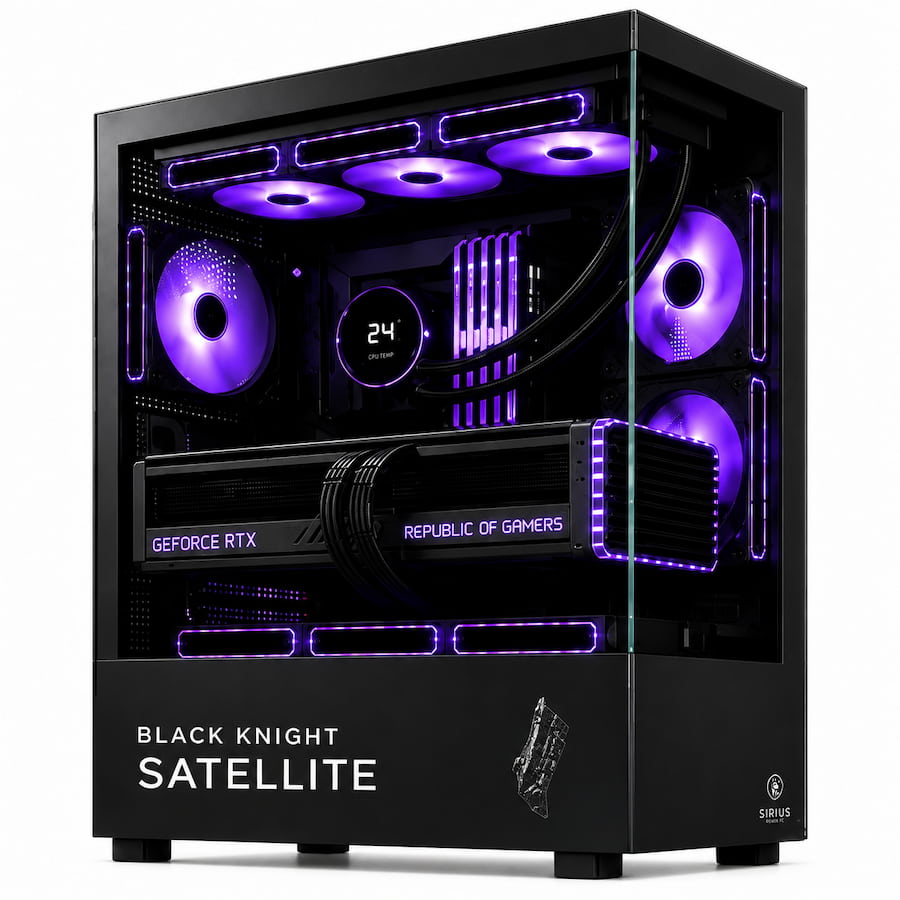
$17,699.99
The Sirius Pro AI Ultra 6096 Workstation is built for local AI, machine learning, large language models, professional rendering, Unreal Engine, CAD, video production, CUDA development, scientific visualization, and other workloads that exceed the practical GPU-memory limits of consumer PCs.
Specifications:
Intel Core Ultra 9 285K – 24 Cores / 24 Threads
NVIDIA RTX PRO 6000 Blackwell Workstation Edition – 96GB ECC GDDR7
ASUS ProArt Z890-CREATOR WIFI Motherboard
64GB DDR5-6000 Memory
Crucial T705 2TB PCIe 5.0 NVMe SSD
Sirius 360mm AIO Liquid Cooler
Black Knight Satellite PC Case
9 Case Fans
1200W PSU
10GbE + 2.5GbE Networking
Wi-Fi 7
Thunderbolt 5
Built around 96GB of professional ECC GPU memory, high-speed Gen5 storage, professional networking, and sustained CPU/GPU performance for serious local AI and production workloads.
96GB Professional Blackwell Graphics. 24-Core Intel Processing. Built for Local AI.
The RTX PRO 6000 96GB AI Workstation is designed for professionals whose workloads exceed the practical limits of conventional gaming PCs and consumer graphics cards.
The defining component is the NVIDIA RTX PRO 6000 Blackwell Workstation Edition with 96GB ECC GDDR7 memory.
That enormous local GPU-memory capacity gives AI engineers, developers, researchers, 3D artists, VFX professionals, architects, engineers, and technical users substantially more room for:
CPU processing comes from the Intel Core Ultra 9 285K, providing 24 total cores across 8 Performance-cores and 16 Efficient-cores.
The rest of the workstation is built around professional connectivity and sustained operation with 64GB DDR5-6000 memory, a Crucial T705 2TB PCIe 5.0 NVMe SSD, ASUS ProArt Z890-CREATOR WIFI motherboard, Sirius 360mm AIO cooling, nine case fans, 1200W power, 10Gb networking, Wi-Fi 7, and Thunderbolt 5.
This is not a gaming PC with a workstation graphics card installed.
It is a professional single-GPU workstation designed around large local GPU memory, sustained compute, fast storage, high-speed networking, and professional expansion.
96GB ECC graphics. Local Blackwell compute. Thunderbolt 5. 10Gb networking. Sirius Built.
| Component | Specification | Professional Role |
|---|---|---|
| CPU | Intel Core Ultra 9 285K – 24 Cores / 24 Threads | Compilation, preprocessing, encoding, application logic, development, and heavy multitasking |
| CPU Cooler | Sirius 360mm AIO Liquid Cooler | Cooling capacity for sustained high-power CPU workloads |
| Motherboard | ASUS ProArt Z890-CREATOR WIFI | Thunderbolt 5, 10GbE, 2.5GbE, Wi-Fi 7, PCIe 5.0, DDR5, and extensive NVMe expansion |
| Memory | 64GB DDR5-6000 CL36 | AI development, editing, 3D work, virtual machines, development, and multitasking |
| Storage | Crucial T705 2TB PCIe 5.0 NVMe SSD | High-speed storage for applications, active models, cache, datasets, and projects |
| GPU | NVIDIA RTX PRO 6000 Blackwell Workstation Edition – 96GB ECC GDDR7 | AI, CUDA, rendering, visualization, simulation, professional graphics, and large GPU-memory workloads |
| Networking | 10GbE + 2.5GbE + Wi-Fi 7 | High-speed NAS, server, dataset, media, and project connectivity |
| External Connectivity | Thunderbolt 5 / USB4 | High-speed storage, docks, displays, capture hardware, and professional peripherals |
| Case | Black Knight Satellite PC Case | Premium serviceable Sirius workstation chassis |
| Case Cooling | 9 Case Fans | Sustained airflow around the GPU, radiator, storage, motherboard, and power hardware |
| Power Supply | 1200W PSU | High-capacity power for the professional GPU, CPU, cooling, storage, and expansion |
| Support | 3-Year Labor Warranty + Lifetime Technical Support | Long-term Sirius workstation support |
| Shipping | Insured Shipping + Wooden Crate Protection | Added protection for high-value professional hardware |
The most important specification in the Sirius Pro AI Ultra 6096 is not RGB lighting, CPU frequency, or even benchmark FPS.
It is 96GB of dedicated GPU memory.
Professional GPU workloads are often limited by whether the active:
can remain inside GPU memory.
When they cannot, software may be forced to:
The RTX PRO 6000 substantially raises that ceiling.
The result is not simply a faster GPU.
It is access to a different class of workload.
The Sirius Pro AI Ultra 6096 is particularly suited to professionals who want substantial AI capability directly on their desk.
Potential workloads include:
Local processing can also be useful when working with:
Local execution does not automatically satisfy every security or compliance requirement.
It does give organizations control over where their compute is performed.
The 96GB graphics-memory pool makes this workstation particularly attractive for local LLM development and inference.
Potential workflows include:
The model that fits cannot be described accurately with one universal parameter count.
Memory requirements depend on:
The appropriate claim is therefore:
96GB of local VRAM gives significantly more room before graphics memory becomes the limiting factor.
The RTX PRO 6000 provides a professional NVIDIA platform for GPU-accelerated development.
Potential environments include:
The Core Ultra processor handles the rest of the development environment while GPU-intensive compute runs on the RTX PRO card.
That can include:
This makes the Sirius Pro AI Ultra 6096 useful not only for running models, but for building the applications around them.
The 96GB GPU can also support model-adaptation workflows including:
Training generally requires substantially more memory than inference because memory may also be needed for:
The 96GB framebuffer dramatically expands what can be attempted on one desktop GPU.
It does not turn every training job into a single-GPU workload.
Very large training projects can still require multi-GPU or server infrastructure.
Large VRAM is also useful for modern generative-media pipelines.
The workstation can be used for:
Complex workflows may load several models or pipeline components simultaneously.
The 96GB memory pool provides substantially more freedom before those components have to be moved between GPU and system memory.
The Sirius Pro AI Ultra 6096 can also serve as a powerful computer-vision workstation.
Potential applications include:
Large VRAM can support:
The RTX PRO 6000 uses ECC-capable GDDR7 memory.
ECC can detect and correct certain memory errors.
That capability becomes particularly relevant when a GPU is running:
ECC does not prevent every software failure or system error.
It provides an additional layer of memory integrity appropriate for professional workloads.
The RTX PRO 6000 is built around NVIDIA’s professional Blackwell architecture.
Its capabilities are aimed at demanding workloads involving:
The workstation edition also provides a professional software and driver ecosystem rather than being designed primarily around gaming.
That difference matters when software stability and professional application support are part of the purchasing decision.
The RTX PRO 6000 defines the workstation, but the CPU still matters.
The Intel Core Ultra 9 285K provides:
The CPU handles workloads such as:
The GPU accelerates supported compute.
The CPU keeps everything around that compute moving.
The Core Ultra 9 combines Performance-cores with Efficient-cores.
That gives the workstation more resources when applications such as:
are running alongside GPU-intensive workloads.
A professional AI system rarely runs one application in isolation.
The CPU configuration reflects that reality.
The ASUS ProArt Z890-CREATOR WIFI is one of the most important supporting components in this build.
The workstation platform provides professional connectivity for:
Key platform capabilities include:
This is the type of motherboard that makes sense when connectivity is part of the workflow rather than an afterthought.
Thunderbolt 5 provides high-bandwidth connectivity for compatible:
For an ordinary gaming system, Thunderbolt may be optional.
For a professional workstation with large datasets and external production hardware, it can be a meaningful feature.
The integrated 10Gb Ethernet connection makes the system suitable for professional network environments.
Potential uses include:
Large AI, video, and 3D projects can involve hundreds of gigabytes or multiple terabytes of data.
Moving those files across conventional Gigabit Ethernet can become a workflow bottleneck.
The workstation already provides the interface required for a 10GbE environment.
A second 2.5Gb Ethernet connection adds networking flexibility.
It can be useful for:
Professional networking is one of the key differences between this workstation and a conventional high-end gaming PC.
Built-in Wi-Fi 7 provides modern wireless connectivity for environments where wired networking is not practical.
For large professional file transfers, the 10GbE connection remains the more predictable solution when compatible network infrastructure is available.
The workstation starts with 64GB DDR5-6000 system memory.
That is a strong baseline for:
GPU VRAM and system RAM perform different jobs.
A GPU having 96GB of VRAM does not mean the workstation no longer needs substantial system memory.
Applications still use RAM for:
Consider increasing system memory for:
More RAM does not automatically make the GPU faster.
It prevents system-memory pressure when the applications surrounding the GPU require more capacity.
The Crucial T705 2TB PCIe 5.0 NVMe SSD provides high-speed primary local storage.
Its role extends well beyond fast Windows startup.
The Gen5 drive can hold:
High-speed storage becomes valuable when professional workloads are actually moving large amounts of data.
The ProArt platform provides extensive NVMe expansion.
That means this workstation does not need to remain a single-drive system.
A professional storage layout could use:
Windows or Linux, drivers, frameworks, development tools, and professional software.
Models, datasets, embeddings, project data, and active assets.
Video cache, render cache, temporary datasets, intermediate files, and simulation cache.
Unreal Engine, Blender assets, video projects, CAD files, or software repositories.
Completed projects, team datasets, archives, and backups can move to 10GbE-connected NAS or server storage.
That is a storage architecture designed around professional workflows rather than simply installing the largest possible C: drive.
The Sirius Pro AI Ultra 6096 is also a serious professional rendering system.
Potential applications include:
The 96GB framebuffer provides room for:
When a scene exceeds available GPU memory, artists may otherwise have to simplify it or break it apart.
The RTX PRO 6000 substantially increases the point at which that becomes necessary.
The workstation is exceptionally well suited to Unreal Engine and real-time visualization.
The platform combines:
That makes it useful for:
Very large projects may justify additional system memory and dedicated project storage.
The professional RTX platform also makes the Sirius Pro AI Ultra 6096 appropriate for demanding design and engineering work.
Potential applications include:
Exact certification should always be checked for the application and driver version being deployed.
The workstation is designed to provide the memory capacity, connectivity, and professional GPU environment these applications often require.
The system is also built for demanding media workflows.
Potential applications include:
The 96GB professional GPU provides enormous graphics-memory headroom for:
The 64GB system-memory configuration provides a strong starting point, while heavier VFX and After Effects environments may justify more RAM.
The RTX PRO 6000 provides multiple dedicated hardware video encoders.
That can be useful for:
This is another example of why the GPU should be evaluated as a professional compute and media device rather than simply by gaming performance.
The Sirius Pro AI Ultra 6096 can support GPU-accelerated research and analytical workflows including:
Not every scientific workload is primarily GPU-bound.
Some depend more heavily on:
The correct workstation always depends on the actual application.
A 1200W PSU makes sense in this workstation because the hardware itself can consume substantial power.
The power supply must support:
For this class of system, PSU quality matters as much as rated wattage.
The final production unit should provide:
A properly sized UPS is strongly recommended for a workstation at this level.
It can provide:
That matters during:
UPS sizing should be based on real system load plus monitors, network equipment, and other protected devices.
The Core Ultra 9 285K can sustain substantial CPU power under demanding workloads.
The Sirius 360mm AIO provides cooling capacity for:
Professional cooling must be evaluated over long workloads, not a short benchmark burst.
The Black Knight Satellite chassis includes nine case fans to support the complete thermal environment.
Airflow helps manage heat from:
Professional workloads may keep the CPU and GPU under load for hours.
The cooling system is built around sustained operation.
The base product should list an operating system only if one is actually included in the final configuration.
A strong fit for:
A strong fit for:
Developers may also use:
The software stack should determine the operating system.
This workstation is built for:
Developers who need substantial local VRAM for inference, evaluation, fine-tuning, computer vision, and AI experimentation.
Professionals building and testing CUDA-accelerated AI applications.
Users working with local GPU-accelerated scientific, analytical, and research workloads.
Professionals whose scenes and textures exceed consumer-GPU memory.
Editors, compositors, colorists, and production teams working with high-resolution media.
Users running CAD, BIM, large assemblies, professional visualization, and digital twins.
Professionals working with large environments, virtual production, real-time visualization, and game development.
Teams that want substantial GPU capability on local infrastructure rather than depending entirely on cloud GPUs.
Choose a GeForce RTX-based Sirius gaming PC.
The majority of this workstation’s cost and capability would be wasted on a gaming-only workload.
Choose a Threadripper or Threadripper PRO workstation for highly parallel CPU workloads.
A Threadripper PRO or server-class platform may be more appropriate.
A platform with more CPU-connected PCIe lanes and greater chassis capacity should be considered.
Choose a dedicated rack workstation or server.
That is exactly where the Sirius Pro AI Ultra 6096 belongs.
A professional workstation at this level should not be tested like an ordinary office PC.
Every Sirius Pro AI Ultra 6096 includes validation of the complete platform.
That includes:
The goal is not merely to verify that the system boots.
The goal is to verify that the completed workstation can sustain the kind of workloads its hardware was purchased to run.
It is designed primarily for local AI, machine learning, professional rendering, Unreal Engine, CAD, VFX, video production, CUDA development, data science, visualization, and other GPU-intensive professional workloads.
It uses the NVIDIA RTX PRO 6000 Blackwell Workstation Edition.
The GPU includes 96GB of ECC GDDR7 memory.
Large GPU-memory capacity allows larger models, scenes, textures, datasets, frame buffers, and compute workloads to remain directly accessible to the GPU.
Yes. It uses ECC-capable GDDR7 memory.
Yes. Large local AI and LLM workloads are among its primary use cases. Exact model compatibility depends on precision, quantization, context length, KV cache, batch size, and software overhead.
Yes. It can support fine-tuning and adapter-based workflows. Very large training jobs may still require multi-GPU infrastructure.
Yes. The large GPU-memory pool is particularly useful for image generation, video generation, multimodal pipelines, and other memory-intensive generative workflows.
Yes. The professional NVIDIA GPU is built for CUDA and GPU-accelerated AI workloads.
The workstation uses the Intel Core Ultra 9 285K.
It has 24 CPU cores: 8 Performance-cores and 16 Efficient-cores.
The configuration includes 64GB DDR5-6000 memory.
128GB can make sense for large datasets, virtual machines, Unreal Engine, VFX, heavy AI preprocessing, and other memory-intensive professional workloads.
It includes a Crucial T705 2TB PCIe 5.0 NVMe SSD.
Yes. The ProArt motherboard provides extensive M.2 expansion.
Yes. The ProArt Z890-CREATOR WIFI provides Thunderbolt 5 connectivity.
Yes. It includes 10GbE and 2.5GbE networking.
Yes.
Yes. The RTX PRO 6000’s professional GPU architecture and 96GB framebuffer make it extremely well suited to large compatible Blender scenes and GPU-rendering workloads.
Yes. The combination of a high-core-count CPU, 96GB GPU memory, system RAM, fast NVMe storage, and professional networking makes it a strong Unreal Engine workstation.
Yes. Its professional GPU and large framebuffer make it suitable for demanding GPU-heavy Resolve environments.
Yes. The workstation provides a high-core-count CPU, professional NVIDIA GPU, DDR5 memory, and fast storage for demanding video-production workflows.
Yes. It is built for professional graphics and visualization. Exact software certification should be checked against the application and driver version being deployed.
It can be an excellent platform for CUDA-accelerated technical workloads. Some scientific applications may require specialized CPU, memory, precision, or server hardware.
No. It can run games, but gaming is not its primary purpose. A GeForce-based Sirius system provides better value for gaming-first customers.
The workstation contains a very high-power professional GPU, high-end Intel processor, liquid cooling, multiple fans, Gen5 storage, and professional expansion hardware.
Yes. A properly sized UPS is strongly recommended for a high-value professional workstation.
The supplied configuration does not specify an operating system. Windows or Linux should be listed only when it is actually included with the final product.
The workstation includes a 3-Year Sirius Labor Warranty, applicable manufacturer warranties, and Lifetime Technical Support.
It is best for AI engineers, machine-learning professionals, researchers, data scientists, CUDA developers, 3D artists, VFX professionals, architects, engineers, Unreal Engine developers, and organizations that need 96GB of professional local GPU memory.
The Sirius Pro AI Ultra 6096 Workstation is built around a simple question:
How much of your workload can remain directly on the GPU?
With 96GB of ECC GDDR7, the NVIDIA RTX PRO 6000 dramatically increases the answer.
That GPU-memory capacity gives AI engineers, developers, researchers, artists, and technical professionals considerably more room for models, datasets, scenes, textures, frame buffers, and professional compute than conventional consumer graphics cards.
The Intel Core Ultra 9 285K provides 24 CPU cores for compilation, preprocessing, encoding, development, application logic, and heavy multitasking.
The 64GB DDR5-6000 memory provides a strong professional starting point for the CPU-side environment.
The Crucial T705 2TB PCIe 5.0 NVMe SSD provides a fast primary working drive, while the ProArt platform leaves substantial room for additional NVMe storage.
The ASUS ProArt Z890-CREATOR WIFI brings the connectivity a professional workstation needs, including Thunderbolt 5, 10GbE, 2.5GbE, Wi-Fi 7, PCIe 5.0, and extensive M.2 expansion.
The Sirius 360mm AIO and nine-fan Black Knight Satellite cooling system are designed around sustained professional workloads rather than short benchmark bursts.
And the 1200W PSU provides the power capacity required for a platform built around one of NVIDIA’s highest-power professional desktop GPUs.
This workstation is not about maximizing gaming FPS.
It is about removing GPU-memory limitations from serious professional work.
96GB ECC Blackwell Graphics. 24-Core Intel Processing. Thunderbolt 5. 10Gb Networking. Local AI. Sirius Built.
You must be logged in to post a review.

-
Select options This product has multiple variants. The options may be chosen on the product page-
Select options This product has multiple variants. The options may be chosen on the product page-
Select options This product has multiple variants. The options may be chosen on the product page-
Select options This product has multiple variants. The options may be chosen on the product page
Reviews
There are no reviews yet.