Sale!

Atlas V8 Ultra 9 285K, 5080 16GB 64GB DDR5

★★★★★ 5 (200+ builds shipped)

Original price was: $3,999.99.Current price is: $3,499.99.

The Atlas V8 pairs an Intel Core Ultra 9 285K with an RTX 5080 16GB GPU and 64GB of DDR5 memory for high-end 4K gaming alongside heavy multitasking and content creation. Every component below can be customized before checkout.

QUICK SPEC LIST

✓ Intel Core Ultra 9 285K — 24-Core               ✓ Zotac GAMING SOLID CORE OC RTX 5080 16GB

✓ 64GB Corsair Vengeance RGB DDR5-6000              ✓ 1TB NVMe SSD + 2TB HDD

✓ 360mm AIO + 10 Case Fans                          ✓ 1200W PSU · Windows 11 Pro

Configuration

Atlas V8 — Base Specifications

This is the starting configuration. Case finish, cooling, motherboard, memory, storage, and OS can all be changed in the configurator above before checkout.

Component Specification What It Delivers
CPU Intel Core Ultra 9 285K (24 Cores, 3.7 GHz Base / up to 5.7 GHz Boost) Flagship-level Intel performance for gaming and multitasking
GPU Zotac GAMING SOLID CORE OC GeForce RTX 5080 16GB High-end 1440p and powerful 4K gaming with modern RTX features
Motherboard MSI MAG Z890 TOMAHAWK WIFI (ATX, LGA1851) Strong power delivery, modern connectivity, and next-gen Intel platform
Memory 64GB Corsair Vengeance RGB DDR5-6000 CL36 Excellent for gaming, content creation, streaming, and heavy multitasking
Storage 1 Patriot P400 Lite 1TB PCIe 4.0 NVMe SSD Fast boot times, quick app launches, and responsive game loading
Storage 2 Seagate Barracuda Compute 2TB 7200 RPM HDD Extra room for large game libraries, videos, media, and project files
Cooling 360mm AIO Liquid Cooler Keeps temperatures under control during heavy gaming and workloads
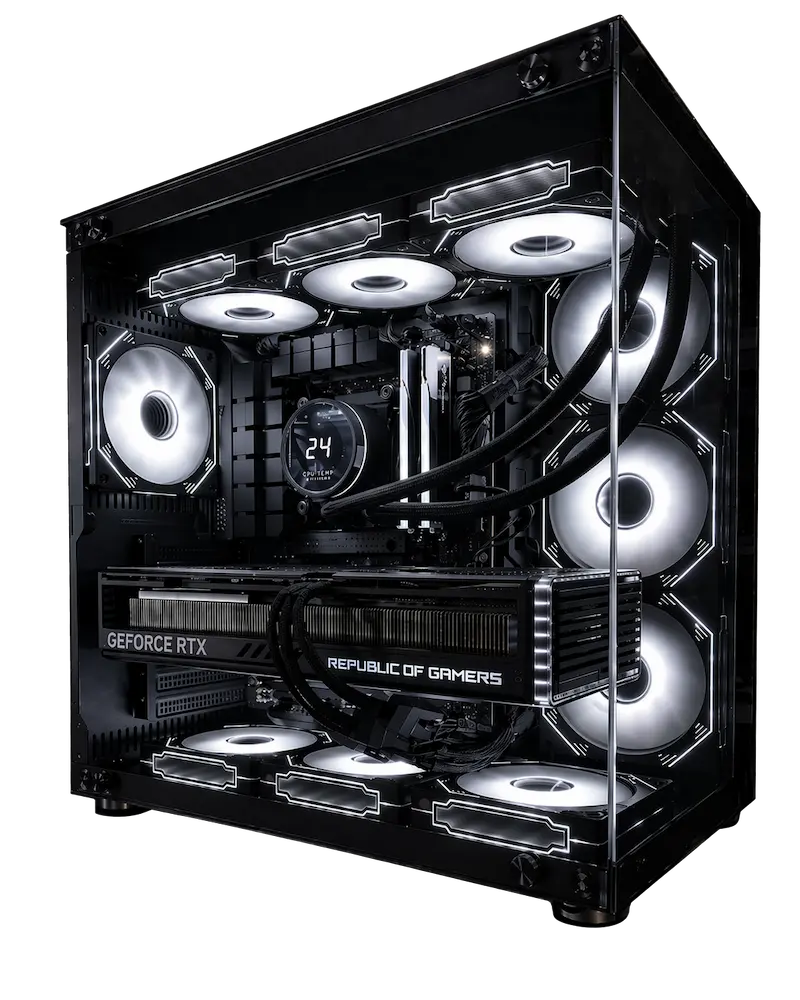
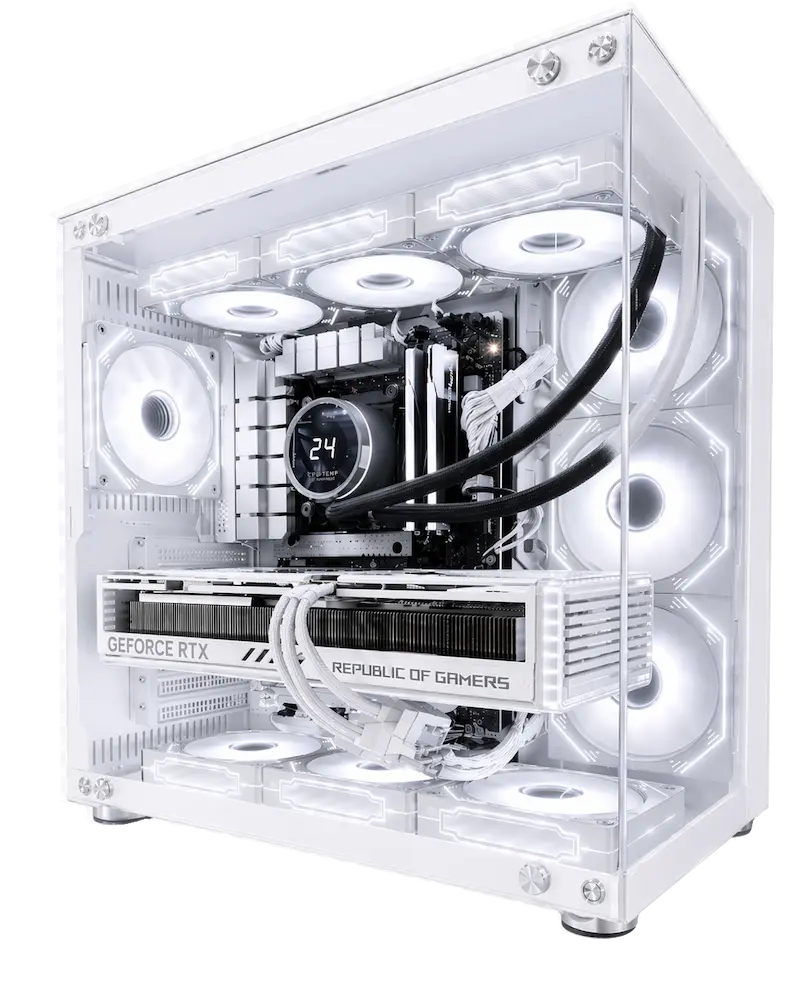
Case Matrix Series Case Clean, aggressive chassis with strong airflow potential
Case Cooling 10 Case Fans High-airflow cooling for better thermal performance
Power Supply 1200W Power Supply Reliable power headroom for a premium system
OS Windows 11 Pro 64-bit Advanced OS features for work, productivity, and gaming
Warranty 3-Year Labor + Manufacturer Part Warranties Covered support for the life of the build
Expected Performance

Gaming Performance on RTX 5080

Estimated ranges for the base configuration. Actual FPS varies by game patch, drivers, and in-game settings.

Game 1440p Ultra 4K High/Ultra Experience
Call of Duty / Warzone 220–270+ FPS 140–180+ FPS Competitive and responsive
Cyberpunk 2077 (RT + DLSS) 140–190+ FPS 90–130+ FPS High detail with strong stability
Apex Legends 250–320+ FPS 170–230+ FPS Locked-in smoothness
Baldur’s Gate 3 170–230+ FPS 120–170+ FPS Smooth RPG experience
Fortnite (UE5) 230–300+ FPS 160–220+ FPS High-refresh ready
Use Cases

Who the Atlas V8 Is Best For

The Core Ultra 9 285K, RTX 5080, and 64GB of memory combination is built for people who need serious gaming performance plus heavy multitasking or creative work on one machine.

🎮

4K & 1440p Gamers

The RTX 5080’s 16GB GDDR7 buffer handles 4K Ultra settings and ray tracing, with strong headroom at 1440p for high-refresh displays.

🎥

Streamers

24 cores give enough headroom to run OBS, Discord, and the game simultaneously without frame drops.

✂️

Video Editors & Creators

64GB of DDR5 memory and dual storage (fast NVMe + high-capacity HDD) support large Premiere Pro and DaVinci Resolve projects without running out of space.

🛠️

Heavy Multitaskers

64GB of RAM comfortably handles many applications, browser tabs, and background tools running at once alongside gaming or work.

Thermals

Built to Stay Fast Under Sustained Load

  • 360mm AIO keeps the 24-core 285K cool during extended gaming and multitasking sessions
  • 10 case fans maintain consistent airflow through the Matrix Series chassis
  • Thermal headroom reduces clock throttling during multi-hour workloads
Atlas Gaming PC
What's Included

Every Sirius Power PC Build Includes

Hand-Built in the USA

Every gaming PC is assembled by experienced builders using premium components and meticulous attention to detail.

Stress-Tested for Reliability

Every system undergoes extensive stress testing and performance validation before it leaves our workshop.

Zero Unnecessary Bloatware

Our gaming PCs arrive clean and optimized, so you can install your favorite games and start playing sooner.

Secure Wooden Crate Shipping

Every gaming desktop is packaged in our protective wooden crate to help safeguard your investment during shipping.

3-Year Labor Warranty

Enjoy added confidence knowing your gaming PC is backed by comprehensive labor warranty coverage.

Lifetime Technical Support

Our experienced support team is here to help whenever you need assistance, upgrades, or technical guidance.

FAQ

Common Questions About the Atlas V8

Is the Atlas V8 good for 4K gaming?

Yes. The RTX 5080 16GB handles 4K Ultra settings and ray tracing in current titles, and the Core Ultra 9 285K prevents CPU bottlenecks in demanding open-world games.

Why does the Atlas V8 have two storage drives?

The 1TB NVMe SSD handles your OS and most-played games for fast load times, while the 2TB HDD provides extra low-cost capacity for large game libraries, media files, and creative projects.

Is 64GB of RAM necessary for gaming?

For gaming alone, 32GB is typically sufficient, but the Atlas V8’s 64GB is built for users who also stream, edit video, or run multiple demanding applications alongside their games.

Can I upgrade the storage or memory later?

Yes. Additional NVMe or HDD storage can be added, and memory can be configured further at checkout or upgraded after purchase.

What warranty comes with the Atlas V8?

Every build includes a 3-year labor warranty from Sirius Power PC plus individual manufacturer warranties on each component, along with lifetime technical support.

Related Builds

Compare With Other Sirius Series

3 year labor warranty + Full Manufacturer Warranty on Every Part

Radeon RX 9060 XT 8 GB
Intel Core i5-12600K
MSI PRO B760-P WiFi DDR4
Corsair Vengeance LPX 16 GB DDR4
Crucial P310 1 TB PCIe 4.0 NVMe

$1,489.99

3 year labor warranty + Full Manufacturer Warranty on Every Part

MSI SHADOW 2X OC RTX 5060 8 GB
AMD Ryzen 5 5500
ASUS PRIME B550-PLUS AC-HES
Corsair Vengeance LPX 16 GB
Crucial P310 1 TB PCIe 4.0 NVMe

Original price was: $1,279.99.Current price is: $1,199.99.

3 year labor warranty + Full Manufacturer Warranty on Every Part

RTX 5070 Ti 16 GB
AMD Ryzen 7 7800X3D
Gigabyte X870 ATX AM5 Motherboard
G.Skill Flare X5 32 GB
Crucial P310 1 TB PCIe 4.0 NVMe

Original price was: $2,799.99.Current price is: $2,599.99.

Why Core Ultra 9 285K + RTX 5080 Work Together

The RTX 5080’s 16GB GDDR7 buffer is what drives this build’s 4K Ultra and high-refresh 1440p performance — it handles modern titles with high-res textures and ray tracing enabled without hitting the VRAM ceiling smaller-buffer cards run into.

The 285K’s 24-core hybrid design keeps that gaming performance consistent even when background load is running alongside it — streaming software, Discord, browser tabs — without pulling frames from the game itself. That’s the CPU’s real contribution here: protecting your gaming performance from everything else running on the system, not just raw benchmark numbers.

This pairing is built for serious 4K/1440p gaming first, with genuine multitasking and creator headroom as a strong secondary capability — not a workstation with gaming bolted on.

Z890 Platform and 64GB of Memory

The MSI MAG Z890 TOMAHAWK WIFI board runs Intel’s current LGA1851 platform, giving this build modern connectivity and reliable power delivery.

64GB of Corsair Vengeance DDR5-6000 goes beyond what gaming alone needs — the extra headroom is there for buyers who also stream, run creative software, or keep heavy multitasking going alongside their gaming sessions. If your use case is gaming plus a real secondary workload (editing, streaming, heavy multitasking), this is where 64GB earns its place over a standard 32GB configuration.

Why Dual Storage (NVMe + HDD) Instead of NVMe-Only

Most Sirius builds ships with a single NVMe drive. Atlas V8 pairs a 1TB NVMe boot drive with a 2TB HDD so your active games and OS stay fast while giving you affordable bulk capacity for a growing library, recorded gameplay, or media — without needing to constantly manage storage space.

If your priority is maximum speed across the board rather than a fast-plus-bulk setup, the storage configuration can be adjusted to all-NVMe before checkout.

Cooling: Why 360mm AIO + 10 Fans Matters for This Build

Sustained 4K gaming sessions push real heat through both the CPU and GPU, and the 360mm AIO is sized to keep the 285K at its rated boost clocks through extended play rather than throttling partway through a long session.

The 10-fan configuration through the Matrix Series chassis maintains consistent airflow so performance holds steady hours into a gaming session — not just during a quick benchmark run.

Software & Creator Performance

Atlas V8 is a gaming-first build, but its core count, memory, and dual-storage setup handle common creator and productivity workloads well when you need them:

Workload Atlas V8 Fit Notes
4K / 1440p Gaming Excellent Primary target — RTX 5080 handles Ultra settings comfortably
OBS Studio Excellent 24 cores keep streaming from touching game performance
Adobe Premiere Pro Very Good 64GB memory and dual storage support large timelines
DaVinci Resolve Very Good Handles complex color and multi-layer timelines well
Blender Good Comfortable for larger scenes than a 32GB configuration allows
Heavy Multitasking (Multiple Apps + Game) Excellent This is the specific scenario 64GB is built for
Programming / Dev Work Very Good Core count and memory headroom for VMs and compiling
Professional Render Farms / Studio Production Consider GOD Series Sustained studio-scale rendering suits a dedicated workstation tier

Upgrade Path for Atlas V8

  1. Storage — Additional NVMe or HDD capacity can be added at checkout beyond the base 1TB + 2TB configuration.
  2. Memory — 64GB is already ahead of most workloads; further configuration is available if needed.
  3. GPU — The 1200W PSU carries headroom beyond the RTX 5080’s draw, giving room for a future GPU upgrade without a PSU swap in most cases (final compatibility depends on the card chosen at the time).
  4. Case Finish — Matrix Black or Matrix White can be selected before checkout.

Is Atlas V8 Right for You?

Choose Atlas V8 if:

  • 4K or high-refresh 1440p gaming is your primary target
  • You also stream, edit, or multitask heavily alongside gaming and want real headroom for it
  • You want fast active storage plus affordable bulk storage rather than a single small NVMe drive

Consider a different Sirius tier if:

  • Gaming is your only use case with minimal multitasking — a Vanguard or Scout build gets you strong 1440p/4K gaming without paying for 64GB of memory you won’t use
  • Your work is professional-scale content production (studio editing, large render farms) as your primary daily use — GOD Series is built around that
  • You want native 4K with the highest possible headroom — Black Knight Satellite Intel V1’s RTX 5090 configuration sits a tier above this build

More Questions About Atlas V8

Does the HDD Slow Down the Whole System?

No — the HDD is used for bulk storage only. Windows, your OS, and actively-played games run from the NVMe drive, so day-to-day responsiveness isn’t affected by the HDD’s slower speeds.

How Loud Is This System Under Heavy Load?

The 360mm AIO and 10-fan configuration are sized for sustained gaming and multitasking load, keeping fan speeds controlled rather than ramping aggressively during typical sessions.

Is Windows 11 Pro Necessary for This Build?

Atlas V8 ships with Windows 11 Pro rather than Home, which adds features like Remote Desktop hosting and BitLocker encryption — relevant if this system is also used for work alongside gaming.

Can I Run This Build With All-NVMe Storage Instead of NVMe + HDD?

Yes — the storage configuration can be adjusted before checkout if you’d rather have all-flash storage instead of the default fast-plus-bulk setup.

Will Future CPU Generations Work With This Motherboard?

The Z890 platform supports Intel’s current LGA1851 socket; future CPU compatibility depends on Intel’s roadmap for that socket generation at the time of any upgrade.

Is This Build Overkill If I’m Only Gaming?

The GPU and cooling are sized for serious 4K/1440p gaming either way, so gaming performance won’t go to waste — but the 64GB memory and dual storage are built for buyers who also multitask or create alongside gaming. If that’s not you, a lower-memory configuration could save cost without affecting gaming performance.

This build can be customized — case finish, motherboard, cooling, memory, and storage — before checkout. Configuration shown above reflects the base Atlas V8 build.