- 888-683-3510
- support@siriuspowerpc.com
- Free Shipping On All Orders Above $1500
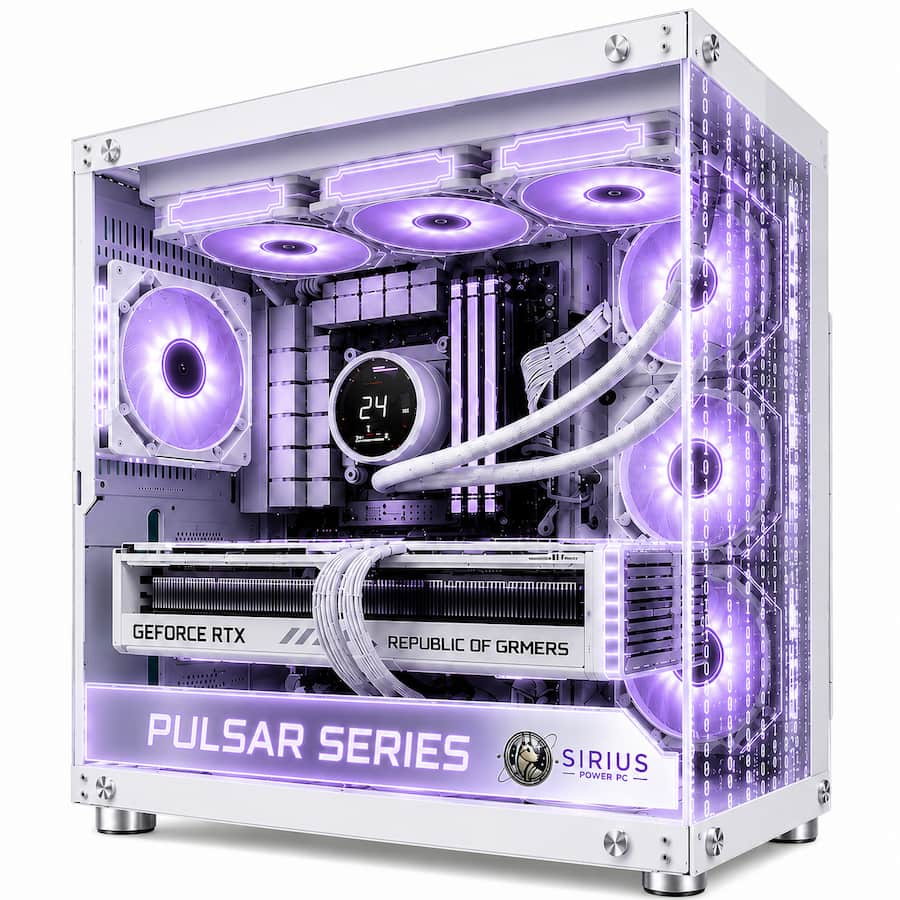
$2,499.99 – $2,799.99Price range: $2,499.99 through $2,799.99
AMD Ryzen 7 9800X3D – 8 Cores / 16 Threads
ASRock Challenger Radeon RX 9070 XT 16GB
MSI PRO X870E-P WIFI Motherboard
32GB DDR5-6000 CL36 Memory
2TB PCIe 4.0 NVMe SSD
360mm AIO Liquid Cooler
Sirius Matrix PC Case
10 Case Fans
850W PSU
Wi-Fi 7 + 5Gb Ethernet
The Pulsar 9800 is built around a simple idea:
Put the performance where serious gamers can actually use it.
At its core is the AMD Ryzen 7 9800X3D, an 8-core / 16-thread Zen 5 processor with AMD 3D V-Cache technology, 96MB of L3 cache, a 4.7 GHz base clock, and boost speeds up to 5.2 GHz.
Instead of pairing that gaming-focused CPU with a midrange graphics card, Pulsar 9800 uses the Radeon RX 9070 XT 16GB.
The RX 9070 XT brings RDNA 4 graphics, 16GB GDDR6 memory, a 256-bit memory interface, and the GPU horsepower needed for demanding modern games at 1440p and 4K.
That combination gives Pulsar 9800 a clear purpose:
The rest of the system supports those two components with 32GB DDR5-6000 dual-channel memory, 2TB NVMe storage, an X870E motherboard, 360mm liquid cooling, 10 case fans, an 850W PSU, and the Sirius Matrix chassis.
This is not a workstation dressed up as a gaming PC.
It is not built around excessive CPU core counts or oversized components that provide little benefit to its target buyer.
It is a gaming-first AMD system built around X3D CPU performance and a 16GB Radeon GPU.
9800X3D. RX 9070 XT 16GB. Matrix Built. Sirius Built.
| Component | Specification | What It Delivers |
|---|---|---|
| CPU | AMD Ryzen 7 9800X3D – 8 Cores / 16 Threads | Gaming-focused Zen 5 performance with 96MB L3 cache |
| CPU Cooling | 360mm AIO Liquid Cooler | Substantial thermal headroom for long gaming sessions |
| Motherboard | MSI PRO X870E-P WIFI | X870E AM5 platform with Wi-Fi 7, 5Gb Ethernet, PCIe 5.0, Gen5 M.2 and DDR5 |
| Memory | 32GB DDR5-6000 CL36 – 2×16GB | Dual-channel memory for gaming, streaming and multitasking |
| Storage | 2TB PCIe 4.0 NVMe SSD | Fast storage with practical capacity for modern game libraries |
| Graphics Card | ASRock Challenger Radeon RX 9070 XT 16GB | High-refresh 1440p, strong 4K gaming and 16GB VRAM |
| Case | Sirius Matrix PC Case | Sirius showcase chassis built around high-performance hardware |
| Case Cooling | 10 Case Fans | High-volume airflow around the GPU, radiator, motherboard and storage |
| Power Supply | 850W PSU | Appropriate power capacity with additional headroom for the complete system |
| Included | Sirius Build Package | 3-Year Labor Warranty, manufacturer warranties, Lifetime Technical Support, insured shipping, wooden crate protection + FREE GAME |
The Ryzen 7 9800X3D is not here because it has the largest CPU specification sheet.
It is here because Pulsar 9800 is a gaming PC.
The processor provides:
The large cache can be especially useful in CPU-sensitive games where the processor repeatedly needs access to game-state data.
That makes this platform particularly attractive for:
It is an 8-core gaming processor because eight fast gaming-focused cores make sense for what Pulsar 9800 is designed to do.
Average FPS gets most of the attention, but it is only part of how a gaming PC feels.
Gaming performance also depends on:
The 9800X3D’s large cache is one of the reasons this CPU is particularly well suited to gaming.
That becomes especially important when chasing high frame rates at 1440p, where the GPU may no longer be the only limiting component.
The Radeon RX 9070 XT gives Pulsar 9800 the graphics performance needed to move well beyond mainstream 1080p gaming.
The GPU provides:
The supplied ASRock Challenger model uses a triple-fan cooling system designed for sustained gaming workloads.
This is a graphics card built for serious gaming.
The RX 9070 XT includes 16GB of GDDR6 graphics memory.
That capacity is especially useful as gaming workloads increase:
At 1440p, 16GB gives the card substantial graphics-memory headroom.
At 4K, that additional memory becomes even more relevant because higher resolutions and high-resolution assets can increase VRAM demand.
More VRAM does not automatically create more FPS.
What it does is give the GPU more room before graphics-memory capacity becomes a constraint.
High-refresh 1440p is the sweet spot for Pulsar 9800.
At 2560×1440, both major components get to contribute.
The RX 9070 XT has enough graphics performance for demanding settings.
The Ryzen 7 9800X3D helps maintain strong CPU performance as frame rates climb.
This makes Pulsar 9800 an excellent match for:
Competitive gamers can prioritize frame rate.
AAA gamers can prioritize image quality.
Pulsar 9800 has enough hardware to do either without changing systems.
The RX 9070 XT also gives Pulsar 9800 strong 4K gaming capability.
That makes it suitable for buyers who want:
It should not be marketed as a no-compromise flagship that will brute-force every game with maximum ray tracing.
That is where more expensive GPU tiers make sense.
Pulsar 9800 instead delivers strong, practical 4K performance without moving into the highest GPU price tiers.
Exact FPS changes with game patches, GPU drivers, graphics presets, ray tracing, upscaling, frame generation, map, and background applications.
These are estimated performance ranges rather than guaranteed results.
| Game | 1440p High / Ultra | 4K High / Ultra | Best Use |
|---|---|---|---|
| Call of Duty / Warzone | 180–240+ FPS | 115–165+ FPS | High-refresh multiplayer |
| Fortnite | 190–280+ FPS | 120–180+ FPS | Competitive / high-refresh |
| Apex Legends | 220–300+ FPS | 150–210+ FPS | Competitive gaming |
| Counter-Strike 2 | 350–500+ FPS | 250–350+ FPS | Very high-refresh esports |
| Valorant | 450+ FPS | 300+ FPS | CPU-sensitive esports |
| Cyberpunk 2077 | 110–160+ FPS | 70–105+ FPS | AAA visuals |
| Forza Horizon 5 | 190–250+ FPS | 125–175+ FPS | High-refresh racing |
| Baldur’s Gate 3 | 180–250+ FPS | 120–170+ FPS | RPG / open-world gaming |
| Red Dead Redemption 2 | 150–200+ FPS | 95–135+ FPS | High-quality AAA gaming |
Ray tracing can substantially reduce native frame rates in demanding titles. Upscaling and frame-generation technologies can increase displayed performance in supported games.
| Resolution | Best Use | Pulsar 9800 Fit |
|---|---|---|
| 1440p | High/Ultra, 165Hz–240Hz, competitive gaming | Excellent / Sweet Spot |
| 4K | AAA gaming, RPGs, racing, cinematic titles | Strong |
| 3440×1440 Ultrawide | Racing, simulation, RPGs, immersive gaming | Excellent |
| 1080p | Extremely high competitive frame rates | More GPU than most users need |
The RX 9070 XT uses AMD’s modern RDNA 4 architecture.
That gives Pulsar 9800 access to newer Radeon features for:
For this particular system, high-resolution raster gaming remains one of its strongest advantages.
The RX 9070 XT includes modern AMD ray-tracing hardware.
That makes ray-traced gaming more viable than on older Radeon generations.
However, ray tracing remains computationally expensive.
In demanding titles, users may benefit from:
If maximum ray-tracing performance is the customer’s absolute priority, an appropriate NVIDIA RTX Sirius system may be the better fit.
If the priority is strong high-resolution raster performance plus 16GB VRAM, Pulsar 9800 is built directly around that use case.
Pulsar 9800 includes 32GB DDR5-6000 CL36 configured as 2×16GB.
That means the system begins in a proper dual-channel configuration.
32GB provides enough capacity for:
For a gaming-first system, this is the right balance.
There is no reason to install 64GB simply to make the specification look more expensive.
Additional memory can make sense if Pulsar 9800 is also used heavily for:
64GB does not automatically create higher gaming FPS when the game already fits inside 32GB.
It gives applications more working capacity.
The 2TB PCIe 4.0 NVMe SSD gives Pulsar 9800 a practical starting capacity.
It provides room for:
For a system at this performance level, 2TB is a much better starting point than making the customer manage a premium game library on a 1TB drive.
The X870E platform provides room for additional high-speed NVMe storage.
That allows Pulsar 9800 to grow with:
The included 2TB drive is the starting point rather than a storage ceiling.
The MSI PRO X870E-P WIFI gives Pulsar 9800 a modern AM5 platform with features appropriate for a high-performance system.
The board provides:
That means Pulsar 9800 does not pair premium CPU and GPU hardware with a bare-minimum motherboard.
The platform gives the system room to grow.
Pulsar 9800 includes both Wi-Fi 7 and 5Gb wired Ethernet.
That is useful for:
Actual network performance still depends on the router, switch, cabling, internet connection, and other network hardware.
But Pulsar 9800 itself is not limited to basic Gigabit networking.
Pulsar 9800 uses AMD’s modern AM5 platform.
That provides a standard desktop foundation for future compatible:
The Ryzen 7 9800X3D is already a high-end gaming CPU.
The value of AM5 is not that you should replace it soon.
The value is that the rest of the PC is built around a modern, serviceable platform.
Pulsar 9800 includes a 360mm AIO liquid cooler.
The cooler gives the Ryzen 7 9800X3D substantial thermal headroom for:
It provides more cooling capacity than the processor needs simply to function.
That is deliberate.
The Matrix chassis includes 10 case fans.
That airflow supports:
Cooling the CPU is only part of the job.
The case also needs to move the GPU’s heat out of the chassis during long gaming sessions.
That is where the 10-fan Matrix configuration earns its place.
Pulsar 9800 uses an 850W power supply.
That gives the system appropriate capacity and headroom for:
This is a balanced power configuration rather than installing an oversized PSU simply because the PC is high-end.
Pulsar 9800 is capable of functioning as a single-PC gaming and streaming system.
A realistic stream setup might include:
The RX 9070 XT supports modern hardware video encoding, including AV1 in compatible applications.
The 8-core / 16-thread Ryzen processor and 32GB memory provide enough CPU and system-memory resources for normal streaming environments.
Pulsar 9800 is gaming-first, but it is not gaming-only.
| Software / Workload | Pulsar 9800 Fit | Best Use |
|---|---|---|
| 1440p Gaming | Excellent | Primary high-refresh target |
| 4K Gaming | Strong | High-quality AAA gaming |
| OBS Studio | Very Good | Streaming and gameplay recording |
| Photoshop | Excellent | Photo editing, thumbnails and design |
| Lightroom | Excellent | Photography workflows |
| Premiere Pro | Good | Gaming content and general video editing |
| DaVinci Resolve | Good / Very Good | General GPU-accelerated editing |
| Blender | Good | General 3D work |
| Unreal Engine | Very Good | Level design, game testing and general development |
| Software Development | Very Good | IDE, coding and game-development workloads |
| Heavy CPU Rendering | Moderate | Ryzen 9 better suited |
| CUDA-Specific Workloads | Not Supported | NVIDIA RTX system required |
Pulsar 9800 can handle:
Its eight Zen 5 cores provide enough CPU performance for normal creator workflows.
However, buyers spending most of their day encoding, rendering, or working in heavily CPU-parallel applications may benefit from a 12-core or 16-core Ryzen 9 Sirius system.
Pulsar 9800 is a gaming PC that can create, not a production workstation disguised as a gaming machine.
The RX 9070 XT’s 16GB VRAM gives Pulsar 9800 useful capacity for GPU-assisted creator applications.
That makes it useful for:
Performance varies according to codec, project complexity, effects, software version, and GPU acceleration support.
Pulsar 9800 is comfortably powerful for:
These applications do not require a workstation-class GPU.
The fast Zen 5 CPU, 32GB memory, and NVMe storage give the system a responsive creator environment.
The RX 9070 XT provides substantial graphics performance and 16GB VRAM, but software ecosystem matters.
Pulsar 9800 can handle:
Buyers whose professional rendering workflow specifically depends on CUDA or OptiX should select an NVIDIA RTX Sirius configuration.
That is not a weakness in Pulsar 9800.
It is choosing the right hardware for the software.
Pulsar 9800 can also serve as a strong gaming and development system.
The combination of:
makes it useful for:
Users building extremely large production projects may benefit from:
This is the system’s strongest overall fit.
The X3D CPU and RX 9070 XT are well matched for high frame rates without giving up graphics quality.
The RX 9070 XT’s 16GB VRAM and high-end graphics capability make strong 4K gaming realistic without moving into the highest GPU price tiers.
Counter-Strike 2, Valorant, Fortnite, Call of Duty, Apex Legends, and similar games can make excellent use of the 9800X3D.
The gaming-focused CPU and high-performance Radeon GPU make Pulsar 9800 well suited to racing, flight simulation, strategy, and CPU-sensitive games.
The system has enough CPU, GPU, and memory resources for normal single-PC gaming and streaming environments.
The X870E motherboard gives the PC PCIe 5.0, Gen5 storage expansion, Wi-Fi 7, 5Gb networking, DDR5, and a modern AM5 foundation.
Choose a higher-core-count Ryzen 9 or workstation configuration.
Choose an NVIDIA RTX Sirius system.
An appropriate GeForce RTX configuration may be a better match.
Pulsar 9800 is substantially more hardware than that workload requires.
That is exactly where Pulsar 9800 belongs.
The system puts its budget into hardware that directly supports gaming performance, cooling, connectivity, storage, and long-term usability.
Every Pulsar 9800 includes:
The completed system is assembled, configured, stress-tested, and validated before shipment.
Yes. High-refresh 1440p is the strongest overall use case for Pulsar 9800. The Ryzen 7 9800X3D is designed around gaming performance, while the RX 9070 XT provides 16GB VRAM and high-end Radeon graphics capability.
Yes. The RX 9070 XT’s 16GB VRAM and performance make strong 4K gaming a realistic target. Demanding ray-traced games may benefit from tuned settings or upscaling.
It uses the AMD Ryzen 7 9800X3D.
It has 8 cores and 16 threads.
The processor can boost up to 5.2 GHz under appropriate operating conditions.
The processor includes 96MB of L3 cache.
Yes. It uses AMD 3D V-Cache technology and is designed specifically as a gaming-focused X3D processor.
The system uses the ASRock Challenger Radeon RX 9070 XT 16GB.
It includes 16GB GDDR6 memory on a 256-bit interface.
Yes. 16GB provides substantial graphics-memory capacity for high-resolution textures and demanding 1440p games.
Yes. Higher resolutions can increase graphics-memory demand, making the RX 9070 XT’s 16GB capacity useful for 4K gaming.
Yes. The RX 9070 XT uses AMD’s modern RDNA 4 ray-tracing hardware.
Yes. The Ryzen 7 9800X3D is particularly well suited to high-refresh gaming and CPU-sensitive titles.
Yes. X3D processors are a strong fit for CPU-sensitive games, while the RX 9070 XT provides enough graphics performance for high-resolution simulation and racing setups.
Yes. It has an 8-core / 16-thread processor, 32GB RAM, and a Radeon GPU with modern hardware video encoding.
Yes, for gaming-content production and mainstream video-editing workloads. Professional CPU-heavy editing and encoding may benefit from a higher-core-count Sirius configuration.
It can handle Blender and general 3D workloads, but customers whose rendering workflow relies heavily on CUDA or OptiX should choose an NVIDIA RTX configuration.
Yes. Its high-performance CPU, 16GB GPU, 32GB DDR5, 2TB NVMe, and X870E platform make it a strong gaming and general game-development system.
It includes 32GB DDR5-6000 CL36 in a 2×16GB dual-channel configuration.
Yes. The motherboard provides additional DDR5 capacity for future memory upgrades.
Usually not significantly if the game already fits comfortably within 32GB. The primary benefit is additional capacity for creator software and heavy multitasking.
It includes a 2TB PCIe 4.0 NVMe SSD.
Yes. The X870E platform supports additional high-speed M.2 storage, including Gen5 capability.
Yes. The system includes Wi-Fi 7.
Yes. The motherboard includes 5Gb Ethernet.
The 360mm cooler gives the Ryzen 7 9800X3D substantial thermal headroom for long gaming sessions and sustained workloads.
Yes. The 850W PSU is appropriately sized for the supplied Ryzen 7 9800X3D and RX 9070 XT configuration while providing additional system headroom.
Yes. It uses a standard AM5 motherboard, DDR5 memory, standard NVMe storage, a replaceable graphics card, and other standard desktop hardware.
Pulsar 9800 is best for high-refresh 1440p gamers, strong 4K gamers, competitive players, simulation enthusiasts, streamers, Radeon buyers, and customers who want X3D gaming performance on a modern AM5 platform without paying for workstation hardware they do not need.
The Pulsar 9800 Ryzen 7 9800X3D RX 9070 XT Gaming PC has a very specific job.
It is built to game.
The Ryzen 7 9800X3D provides eight Zen 5 cores, sixteen threads, 96MB L3 cache, and AMD 3D V-Cache for gaming-focused CPU performance.
The Radeon RX 9070 XT 16GB provides RDNA 4 graphics and enough graphics memory to make high-refresh 1440p and strong 4K gaming realistic targets.
The 32GB DDR5-6000 dual-channel memory provides the capacity a modern high-end gaming system actually needs.
The 2TB NVMe SSD gives games and applications practical room from day one.
The MSI PRO X870E-P WIFI adds a modern AM5 platform with PCIe 5.0, Gen5 M.2, Wi-Fi 7, and 5Gb Ethernet rather than pairing premium CPU and GPU hardware with a bare-minimum motherboard.
The 360mm AIO and 10-fan Matrix cooling configuration provide substantial system airflow.
And the 850W PSU gives the RX 9070 XT configuration useful power headroom while staying sensibly matched to the actual hardware.
That balance is what defines Pulsar 9800.
It does not spend money just to increase the specification count.
It puts the performance where a serious gamer can use it.
9800X3D. Radeon RX 9070 XT 16GB. High-Refresh 1440p. Strong 4K. Matrix Built. Sirius Built.
| PC Case | Matrix Black, Matrix White |
|---|---|
| GPU | 5070 TI, 9070 XT |

-
Select options This product has multiple variants. The options may be chosen on the product page-
Select options This product has multiple variants. The options may be chosen on the product page-
Select options This product has multiple variants. The options may be chosen on the product page-
Select options This product has multiple variants. The options may be chosen on the product page