
Elite 4K Gamers
The RTX 5090’s 32GB GDDR7 buffer handles 4K Ultra with full ray tracing and DLSS without compromise.


★★★★★ 5 (200+ builds shipped)
$9,789.99
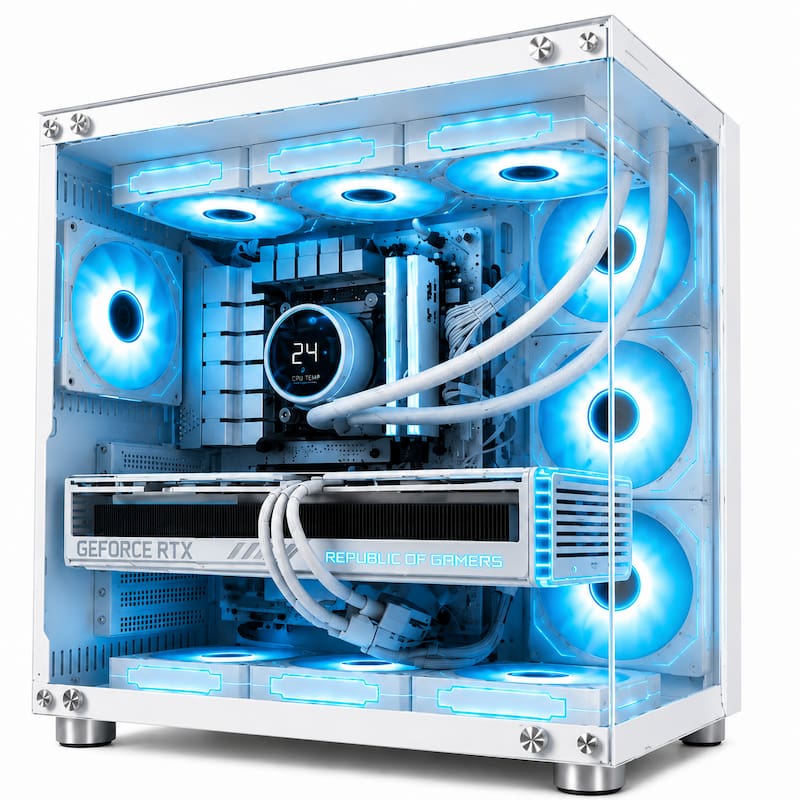
The Atlas V2 pairs a 24-core Intel Core Ultra 9 285K with an RTX 5090 32GB GPU and 64GB of DDR5 memory for elite 4K gaming, AI workloads, and workstation-class multitasking. Every component below can be customized before checkout.
✓ Intel Core Ultra 9 285K — 24-Core Hybrid ✓ RTX 5090 32GB
✓ 64GB Corsair Vengeance RGB DDR5 ✓ 2TB PCIe NVMe SSD
✓ Sirius Cryo 360mm AIO + 10 Fans ✓ 1200W PSU · Windows 11 Pro
This is the starting configuration. Case color, cooling, memory, storage, and OS can all be changed in the configurator above before checkout.
| Component | Specification | What It Delivers |
|---|---|---|
| CPU | Intel Core Ultra 9 285K (24-Core Hybrid, up to 5.7 GHz Boost) | Flagship Intel performance for gaming and heavy workloads |
| GPU | RTX 5090 32GB GDDR7 | Ultimate 4K, AI, and creator performance |
| Motherboard | MSI MAG Z890 TOMAHAWK WIFI (LGA1851) | Next-gen Intel platform with Wi-Fi |
| Memory | 64GB (2×32GB) Corsair Vengeance RGB DDR5 | Extreme multitasking and creator memory headroom |
| Storage | 2TB PCIe NVMe SSD | Fast, responsive system and game loads |
| Cooling | Sirius Cryo 360mm AIO | Sustained peak clocks under sustained load |
| Case | Matrix PC Case (Black or White) | Aggressive design with maximum airflow |
| Case Cooling | 10× High-Airflow Fans | Extreme thermal control |
| Power Supply | 1200W Power Supply | Built for flagship GPU stability |
| OS | Windows 11 Pro 64-bit | Professional-grade features |
| Warranty | 3-Year Labor + Manufacturer Part Warranties | Covered support for the life of the build |
Estimated ranges for the base configuration. Actual FPS varies by game patch, drivers, and in-game settings.
| Game | 1440p Ultra | 4K High/Ultra | Experience |
|---|---|---|---|
| Call of Duty / Warzone | 260–320+ FPS | 175–230+ FPS | Competitive and responsive |
| Cyberpunk 2077 (RT + DLSS) | 170–230+ FPS | 115–160+ FPS | Elite ray tracing with strong stability |
| Apex Legends | 290–360+ FPS | 210–270+ FPS | Locked-in smoothness |
| Baldur’s Gate 3 | 200–260+ FPS | 145–195+ FPS | Smooth RPG experience |
| Fortnite (UE5) | 270–340+ FPS | 195–250+ FPS | High-refresh ready |
The Core Ultra 9 285K, RTX 5090, and 64GB of memory combination is built for people who treat this machine as both a gaming rig and a full workstation.
The RTX 5090’s 32GB GDDR7 buffer handles 4K Ultra with full ray tracing and DLSS without compromise.
32GB of VRAM and 64GB of system memory support large AI models and compute-heavy pipelines.
64GB of DDR5 keeps 8K editing timelines and 3D rendering in Blender or Unreal Engine responsive.
24 cores and 64GB of memory handle large codebases and multiple virtual machines running simultaneously.

Hand-Built in the USA
Every gaming PC is assembled by experienced builders using premium components and meticulous attention to detail.
Stress-Tested for Reliability
Every system undergoes extensive stress testing and performance validation before it leaves our workshop.
Zero Unnecessary Bloatware
Our gaming PCs arrive clean and optimized, so you can install your favorite games and start playing sooner.
Secure Wooden Crate Shipping
Every gaming desktop is packaged in our protective wooden crate to help safeguard your investment during shipping.
3-Year Labor Warranty
Enjoy added confidence knowing your gaming PC is backed by comprehensive labor warranty coverage.
Lifetime Technical Support
Our experienced support team is here to help whenever you need assistance, upgrades, or technical guidance.
The Atlas V2 is available in Matrix Black or Matrix White — both use the identical internal hardware and cooling setup, so the choice comes down to aesthetic preference.
With 10 case fans and a 360mm AIO handling cooling duties, fan curves are tuned to ramp up gradually under load rather than jumping straight to max speed, keeping noise reasonable during typical gaming sessions while still providing full cooling headroom for sustained rendering or AI workloads.
Both. The performance cores handle game threads directly for strong frame rates, while the efficiency cores take on background tasks like streaming software, Discord, or downloads — so gaming performance stays consistent even with other apps running.
The Atlas V2 uses the newer Core Ultra 9 285K on a Z890 platform, while the Atlas V1 uses the previous-generation i9-14900K on a Z790 platform. Both pair with the same RTX 5090 32GB and 64GB of memory, so the difference mainly comes down to CPU generation and platform features like Wi-Fi 7 support.
Yes. With 24 cores and 64GB of memory, the Atlas V2 has the headroom to run several virtual machines or a large codebase alongside other applications without significant slowdown.

AMD Ryzen 9 9950X3D — 16C / 32T
GeForce RTX 5080 16GB (PNY OC)
32GB DDR5-6000 RGB (Upgradable)
2TB PCIe 4.0 NVMe SSD (Crucial P310)
Sirius 360mm AIO + 10 Case Fans
$3,949.99

Radeon RX 9070 16 GB
AMD Ryzen 7 9700X
MSI B650 Gaming Plus WiFi
32 GB
1 TB PCIe NVMe
$2,499.99 Original price was: $2,499.99.$2,199.99Current price is: $2,199.99.

$189.99 Original price was: $189.99.$149.99Current price is: $149.99.
Neither component is the “supporting” piece in this build — both are sized to run at their limits simultaneously. The 285K’s 24 cores keep frame delivery and background processing running in parallel without one starving the other, which matters because the RTX 5090 is capable of feeding frames faster than a lower-core CPU could keep pace with in demanding titles.
The RTX 5090’s 32GB GDDR7 buffer is why this build handles native 4K ray tracing without dropping settings — most 4K path-traced titles and large AI/creative workloads hit VRAM limits on smaller cards before they exhaust GPU compute. 32GB removes that ceiling entirely, whether the workload is gaming, an AI model, or a rendering pipeline.
The MSI MAG Z890 TOMAHAWK WIFI puts this build on Intel’s current LGA1851 platform — meaning future CPU generations and PCIe 5.0-era components aren’t bottlenecked by an older platform generation the way a Z790-based build would be over time.
64GB of Corsair Vengeance DDR5 ships from the base configuration because this build’s target workloads — large AI models, 8K editing timelines, heavy multitasking during rendering — routinely exceed what 32GB comfortably handles. If your use case is gaming-only, this is more memory than you’ll use; if AI, video, or development work is part of your workflow, it’s the reason this tier exists.
2TB gives you room for a serious game library alongside project files, AI datasets, or development environments, all of which consume space faster than gaming alone. Given the workload this build targets, additional NVMe capacity is worth considering at checkout if you know your storage needs will be substantial from day one.
The 285K and RTX 5090 both draw meaningfully more power than mid-tier builds, and that heat has to go somewhere without throttling either component. The Sirius Cryo 360mm AIO is built specifically to keep the CPU at rated boost clocks through extended sessions — rendering, AI training, or long gaming runs that last hours rather than minutes.
The Matrix chassis’s airflow-first design is what lets that cooling capacity actually get used — it’s not just about the AIO itself, but about how consistently air moves through the case to support sustained peak clocks rather than short bursts.
This is a flagship workstation-class build, and it’s worth being direct about who benefits from it:
This build makes sense if:
A lower tier makes more sense if:
Is 64GB of Memory Necessary for Gaming Alone?
No — for gaming alone, 32GB is typically sufficient. 64GB earns its place here for AI workloads, 8K editing, or heavy multitasking during rendering; if your use case doesn’t include those, you’re paying for headroom you won’t use.
Will Future GPU Generations Require a New Power Supply?
In most cases, no — the 1200W PSU carries headroom beyond the RTX 5090’s current draw, though final compatibility always depends on the specific card at the time of any future upgrade.
Does This Build Support Multiple Storage Drives?
Yes — additional NVMe storage beyond the base 2TB drive can be configured at checkout for larger libraries, project files, or datasets.
Is This Build Better for AI Work or Gaming?
Both, by design — the CPU core count, GPU VRAM, and system memory are sized specifically for people who need elite gaming performance and serious AI/creative capability from the same machine, not favoring one over the other.
Will Wi-Fi 7 on This Platform Make a Practical Difference?
Wi-Fi 7 delivers higher real-world throughput and lower latency than previous standards, useful for large file transfers or streaming — a wired Gigabit connection remains the most consistent option for competitive gaming regardless.
How Does 8K Video Editing Actually Perform on This Build?
64GB of memory keeps large 8K timelines responsive in scrubbing and preview, while the RTX 5090’s GPU acceleration handles encode/decode and effects rendering — export times will still vary based on codec and effect complexity.
This build can be customized — case color, cooling, memory, and storage — before checkout. Configuration shown above reflects the base Atlas V2 build.