
AI Engineers & ML Professionals
96GB of VRAM supports local LLM inference, fine-tuning, and CUDA-accelerated development.
★★★★★ 5 (200+ builds shipped)
$18,199.99
The Sirius Pro AI 6096 pairs an NVIDIA RTX PRO 6000 Blackwell 96GB ECC workstation GPU with an AMD Ryzen 9 9950X for local AI, professional 3D rendering, and GPU-heavy creator workloads that exceed consumer graphics card memory limits. Every component below can be customized before checkout.
✓ NVIDIA RTX PRO 6000 Blackwell — 96GB ECC GDDR7
✓ AMD Ryzen 9 9950X — 16-Core / 32-Thread
✓ 64GB DDR5-6000 System Memory
✓ Crucial T705 2TB PCIe 5.0 NVMe SSD
✓ 10GbE + 2.5GbE + Wi-Fi 7 + Dual USB4
✓ Sirius 360mm AIO + 9 Case Fans · 1200W PSU
This is the base configuration. Additional memory, storage, and upgrade options can be discussed in the configurator above before checkout.
| Component | Specification | What It Delivers |
|---|---|---|
| CPU | AMD Ryzen 9 9950X (16 Cores / 32 Threads, 4.3GHz Base / up to 5.7GHz Boost) | Compilation, CPU rendering, data preparation, encoding, development, and heavy multitasking |
| GPU | NVIDIA RTX PRO 6000 Blackwell Workstation Edition — 96GB ECC GDDR7 | AI, rendering, visualization, professional graphics, CUDA, and large GPU-memory workloads |
| Motherboard | ASUS ProArt X870E-CREATOR WIFI (ATX, AM5) | Professional connectivity with 10GbE, 2.5GbE, Wi-Fi 7, dual USB4, PCIe 5.0, and four M.2 slots |
| System Memory | 64GB DDR5-6000 | Professional working memory for AI preparation, editing, 3D, development, and multitasking |
| Primary Storage | Crucial T705 2TB PCIe 5.0 NVMe SSD | High-speed storage for OS, software, current models, datasets, and active projects |
| Cooling | Sirius 360mm AIO Liquid Cooler | Sustained CPU cooling during long professional workloads |
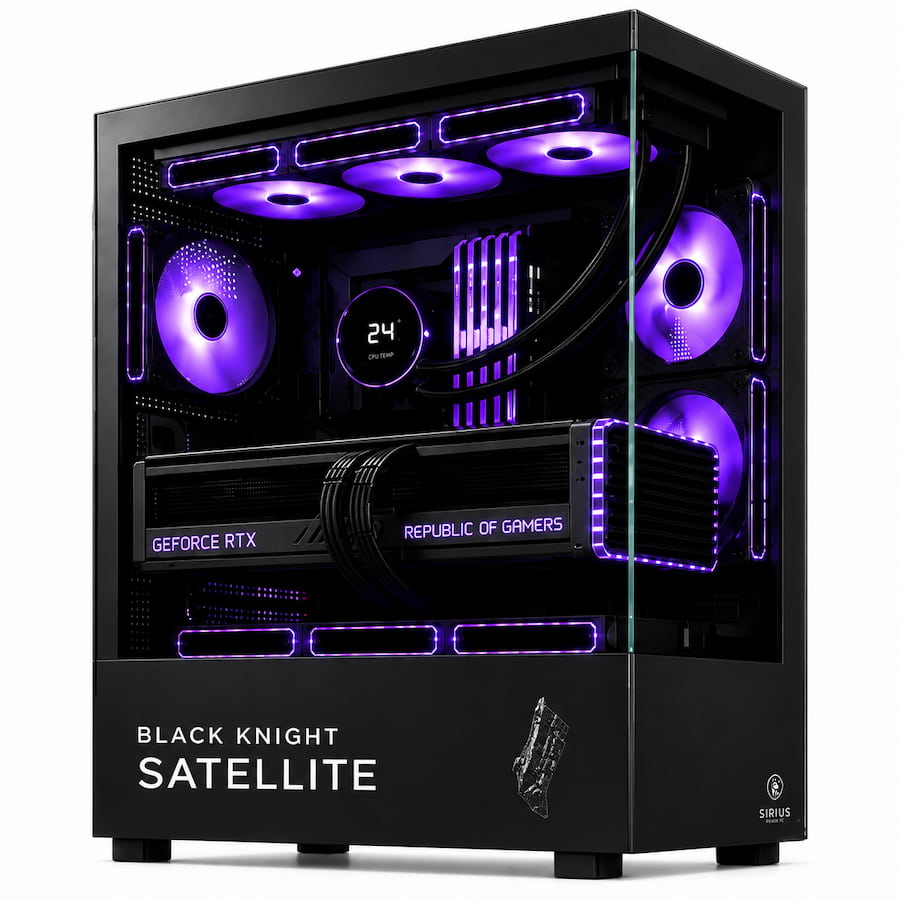
| Case | Black Knight Satellite PC Case | Premium, serviceable workstation chassis |
| Case Cooling | 9 Case Fans | Sustained airflow for the GPU, motherboard, storage, and radiator |
| Networking | 10GbE + 2.5GbE + Wi-Fi 7 | High-speed NAS, server, dataset, and network connectivity |
| External Connectivity | Dual USB4 | High-speed external storage, displays, docks, and professional peripherals |
| Power Supply | 1200W PSU | Power capacity for the professional GPU, Ryzen 9 platform, cooling, and expansion |
| Warranty | 3-Year Labor Warranty + Lifetime Technical Support | Long-term Sirius workstation support |
This is not a gaming PC, so performance here is framed around GPU memory capacity and sustained compute rather than frame rates. Actual results vary by application, model size, precision, and workload configuration.
| Workload Type | What 96GB VRAM Enables |
|---|---|
| Local AI / LLM Inference | Substantially more model, context, and batch headroom than consumer GPUs |
| Fine-Tuning / LoRA | More room for gradients, optimizer states, and activations during adaptation workflows |
| 3D Rendering (Blender, Maya, etc.) | Larger scenes, higher-resolution textures, and complex lighting data can remain GPU-resident |
| Generative Image & Video | Multiple models and pipeline components can run without exceeding GPU memory |
| Unreal Engine / Virtual Production | Large environments, Nanite-heavy projects, and real-time rendering with more headroom |
| Video Production (Resolve, Premiere) | Large frame buffers and GPU effects for 4K–8K timelines |
This table reflects the live page’s own framing of workload capability rather than a benchmark table, since no FPS or performance-testing data is published for this product.
This workstation is built for professionals whose workloads exceed the practical memory limits of consumer graphics cards — not for gaming.
96GB of VRAM supports local LLM inference, fine-tuning, and CUDA-accelerated development.
Large scenes, high-resolution textures, and complex lighting can stay GPU-resident in Blender, Maya, and similar tools.
Strong GPU-accelerated performance for DaVinci Resolve, Premiere Pro, and high-resolution timelines.
Professional drivers and large GPU memory support CAD, BIM, and engineering visualization workflows.

Hand-Built in the USA
Every gaming PC is assembled by experienced builders using premium components and meticulous attention to detail.
Stress-Tested for Reliability
Every system undergoes extensive stress testing and performance validation before it leaves our workshop.
Zero Unnecessary Bloatware
Our gaming PCs arrive clean and optimized, so you can install your favorite games and start playing sooner.
Secure Wooden Crate Shipping
Every gaming desktop is packaged in our protective wooden crate to help safeguard your investment during shipping.
3-Year Labor Warranty
Enjoy added confidence knowing your gaming PC is backed by comprehensive labor warranty coverage.
Lifetime Technical Support
Our experienced support team is here to help whenever you need assistance, upgrades, or technical guidance.
It uses the NVIDIA RTX PRO 6000 Blackwell Workstation Edition with 96GB of ECC GDDR7 memory. Large GPU memory allows bigger AI models, datasets, rendering scenes, and textures to stay directly on the GPU instead of constantly moving data between system and graphics memory — which matters far more for professional workloads than for gaming.
Yes. The 96GB VRAM pool is designed for local LLM inference, quantized model testing, RAG pipelines, and fine-tuning experiments. The exact model size that fits depends on precision, quantization, and context length rather than a fixed parameter count.
This system is built for compute and production work, not gaming. The standard Ryzen 9 9950X delivers strong 16-core, 32-thread multicore performance for compilation, encoding, and data processing without centering the build around a gaming-oriented cache feature.
The standard 64GB is a strong professional baseline. 128GB makes sense if you’re working with large Unreal Engine projects, multiple virtual machines, heavy After Effects or Resolve timelines, large AI datasets, or big CAD assemblies that push past 64GB of active memory use.
It can run games, but that isn’t what it’s built for. A GeForce-based Sirius gaming PC delivers better value for anyone whose primary use is gaming — this workstation’s value is in its 96GB of professional GPU memory, ECC reliability, and sustained compute capability for AI, rendering, and creator workloads.

PNY ARGB EPIC-X RGB OC RTX 5080 16GB
AMD Ryzen 9 9950X3D
Gigabyte X870 GAMING WIFI6
64GB DDR5
4TB PCIe 4.0 NVMe
$4,669.99 Original price was: $4,669.99.$4,449.99Current price is: $4,449.99.

Radeon RX 9060 XT 8GB
Intel Core i9-12900K
ASUS Z790 Max WiFi (ATX, LGA1700)
Crucial Pro Overclocking 32GB DDR5-6000
Crucial P310 1TB NVMe PCIe 4.0 SSD
$2,299.99

$189.99 Original price was: $189.99.$149.99Current price is: $149.99.
The 96GB of ECC GPU memory is what defines this workstation, but it’s the Ryzen 9 9950X’s 16 cores and 32 threads that keep everything around the GPU from becoming the bottleneck instead. Data preprocessing, compilation, encoding, and simulation setup all run on the CPU before or alongside GPU work — if the CPU can’t keep pace, the GPU sits idle waiting for data. This pairing is built so that doesn’t happen.
This is a deliberate single-GPU-plus-strong-CPU configuration rather than a GPU bolted onto a gaming-tier processor. The 9950X’s standard (non-X3D) design reflects that: workstation workloads are typically bound by GPU memory, CUDA throughput, and multi-core CPU performance, not by the cache-sensitive gaming scenarios X3D chips are optimized for.
ECC (error-correcting code) memory can detect and correct certain memory errors during operation. In gaming, an uncorrected memory error might cause a visual glitch or a crash you restart from in seconds. In a multi-hour AI training run, a large render, or a scientific calculation, an unnoticed error can silently corrupt results you don’t discover until much later — after hours of compute time are already spent.
ECC doesn’t eliminate every source of instability, but it’s a meaningful reliability layer that consumer GeForce cards don’t offer, and it’s part of what separates this GPU class from a gaming card with a larger memory number attached.
The base 2TB Crucial T705 handles your OS, applications, and current active projects well. But workstation use cases at this tier — AI datasets, video footage, 3D scenes, development repositories — often benefit from separating data by role rather than putting everything on one drive:
The ASUS ProArt board’s four M.2 positions make this kind of tiered storage setup straightforward to configure at checkout if your workflow benefits from it, rather than something you’d need to retrofit later.
10GbE matters specifically if you’re pulling large datasets or models from a NAS or project server — at that speed, network storage stops being a bottleneck compared to local drives for many workflows. 2.5GbE gives you a second wired option (management network, secondary LAN) without needing an add-in card. Dual USB4 covers high-speed external storage, capture devices, or docks without eating into your PCIe lanes.
None of this matters if your workflow is entirely local, single-machine work — but if you’re operating in a studio, lab, or team environment with shared storage, this connectivity is what keeps the workstation from being an island.
The 1200W rating reflects peak capacity, not constant draw — day-to-day usage sits well below that ceiling, with higher draw occurring during sustained full-load AI training, rendering, or simulation work.
Given the value of a long-running job — a multi-hour training run, a large render, an extended simulation — a properly sized UPS is worth considering separately from the PC itself. It won’t make anything faster, but it protects against losing hours of compute to a brief power interruption, which is a real risk profile difference from a typical desktop.
The base 64GB ships as a matched 2×32GB kit — using two of the four available DIMM slots rather than filling all four, which keeps memory training clean and leaves a straightforward path to add more later without needing to replace existing sticks.
64GB is a strong baseline for most AI, development, and single-application creative work. Where it starts to feel tight: large Unreal Engine projects, multiple simultaneous virtual machines, heavy After Effects or Resolve timelines with large caches, or AI preprocessing pipelines that load substantial data into system RAM before it reaches the GPU. If more than one of those describes your regular workflow, 128GB is worth configuring from the start rather than adding later.
Choose this workstation if:
Consider a different path if:
Does This System Support Multi-GPU Configurations?
This is a single-GPU workstation platform built around one very high-memory professional GPU. Workflows genuinely requiring multiple GPUs are better suited to server-class or multi-GPU workstation infrastructure.
What’s the Realistic Power Draw for AI Training vs. Everyday Use?
Everyday use (development, light inference, general applications) draws well below the PSU’s peak rating. Sustained full-load AI training or heavy rendering pushes draw meaningfully higher — the 1200W PSU is sized for that ceiling, not typical daily use.
Can I Run This Workstation Headless or Remotely for AI Jobs?
Yes — the system supports standard remote access and headless operation for long-running AI or render jobs, though specific remote-access software and configuration should be set up according to your workflow.
Does the Motherboard Support ECC System Memory, or Just ECC GPU Memory?
The ECC capability referenced here is specific to the RTX PRO 6000’s GDDR7 GPU memory; confirm with our team if ECC system RAM (rather than standard DDR5) is a requirement for your specific compliance or reliability needs.
How Does This Compare to Renting Cloud GPU Time for the Same Workloads?
Local hardware has a higher upfront cost but no ongoing per-hour compute charges, no data upload requirements for large or sensitive datasets, and no dependency on cloud availability — the tradeoff depends on how consistently you run GPU-heavy work versus occasional bursts.
What Professional Software Certifications Does the RTX PRO 6000 Support?
NVIDIA maintains certified driver support for major CAD, DCC, and visualization applications on the RTX PRO line; specific certification status should be checked against the exact software version you plan to deploy, as certifications are updated over time.
This workstation can be customized — memory, storage, and configuration — before checkout. Configuration shown above reflects the base Sirius Pro AI 6096 build.